Check Your Drive's Health with S.M.A.R.T.
Use CrystalDiskInfo (Windows) or smartmontools (Mac/Linux) to monitor drive health. Key attributes to watch: Reallocated Sector Count, Current Pending Sector, and Uncorrectable Sector Count.
A head crash occurs when the read/write heads physically contact the spinning platters inside your hard drive, causing catastrophic damage. Our ISO Class 5 cleanroom and PC-3000 tools enable us to recover data even from severely crashed drives with a 94% success rate.
Class 5 Certified
In-House Capability
Only pay for success
No obligation quote
Class 5 certified lab
Australia-wide express
Round the clock service
A head crash is one of the most severe forms of hard drive failure, but understanding how it happens can help you protect your data.
A head crash (also known as a disk crash) occurs when the read/write head of a hard disk drive makes physical contact with the rotating platter surface, causing permanent damage to the magnetic coating where your data is stored.
In normal operation, the read/write heads "fly" on a cushion of air just 3-8 nanometers above the platter surface – that's approximately 1/25,000th the width of a human hair! This incredibly precise engineering is what makes hard drives so susceptible to physical shock and contamination.
According to Seagate's technical documentation, modern hard drives operate with a fly height so small that a single particle of smoke (0.25 microns) or a fingerprint (40 microns) can cause a head crash.
When a head crash occurs, the following chain of events takes place:
The head touches the platter surface due to shock, wear, or contamination
The head scrapes the magnetic coating off the platter, destroying data sectors
Microscopic debris particles are created and spread across the platter
Debris causes additional head strikes, creating circular scratch patterns called "rings of death"
Head crashes are particularly devastating because:
According to Ontrack data recovery research, running a drive with a head crash for just 10 seconds can destroy thousands of data sectors. If you suspect a head crash, power off immediately!

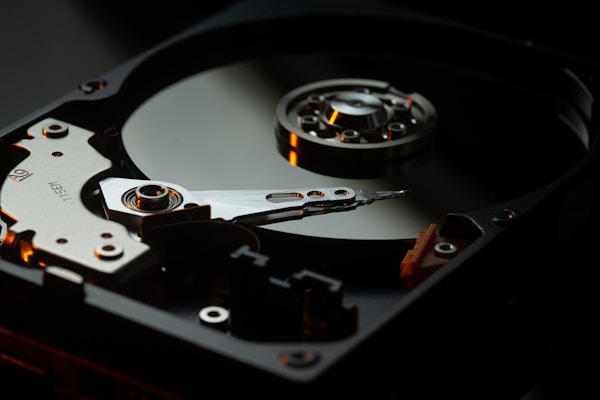
Cross-section of a hard drive showing the delicate components involved in a head crash. Image: Wikimedia Commons
Learn to identify head crash symptoms and understand what causes this catastrophic failure to prevent future data loss.
Repetitive clicking (often called "click of death") indicates the heads are repeatedly trying and failing to read data. This is the most common head crash symptom.
Metal-on-metal grinding indicates the heads are in direct contact with the platters. Severe damage is occurring with every rotation.
BIOS/OS doesn't detect the drive, or it appears with wrong capacity. The heads may be stuck on the platters (stiction) or severely damaged.
Drive takes minutes to respond or freezes the computer. This may indicate partial head failure or developing bad sectors from head damage.
Files become corrupted, won't open, or show CRC errors. Early sign that heads are failing to read data correctly from damaged areas.
System hangs when accessing the drive, or computer spontaneously restarts. The drive may be experiencing intermittent head contact.
Use CrystalDiskInfo (Windows) or smartmontools (Mac/Linux) to monitor drive health. Key attributes to watch: Reallocated Sector Count, Current Pending Sector, and Uncorrectable Sector Count.
Dropping a laptop, bumping a desktop, or rough handling during shipping. According to Backblaze's research, physical shock is a leading cause of premature drive failure.
Over time, head components degrade and the protective layer on platters wears thin. Most hard drives have a MTBF of 300,000-1,200,000 hours, but real-world lifespan averages 3-5 years.
Microscopic defects in heads or platters from manufacturing. These often cause premature failure within the first year. Certain drive models have known issues – check Backblaze's drive stats.
Excessive heat causes thermal expansion, reducing the microscopic clearance between heads and platters. Poor ventilation or failed cooling can accelerate head crash risk.
Sudden power loss can cause heads to land improperly on the platters instead of parking safely on the ramp. Power surges can damage head preamps.
Smoke particles, dust, or humidity entering the drive enclosure. Even a single particle can cause a head crash – this is why recovery requires ISO cleanroom conditions.
Sound identification can help diagnose your drive's problem. Listen carefully when powering on your drive (briefly!) and compare to these common failure sounds.
Pattern: Repetitive click-click-click every 1-2 seconds
Cause: Heads failing to read servo data, repeatedly recalibrating
Severity: Critical – Stop immediately
Listen to examplePattern: Continuous metal-on-metal grinding noise
Cause: Heads in physical contact with platters
Severity: Catastrophic – Unplug NOW
Listen to examplePattern: High-pitched beep on power-up, drive doesn't spin
Cause: Seized spindle motor OR heads stuck on platters (stiction)
Severity: Severe – Requires cleanroom
Listen to examplePattern: Complete silence, no spin-up
Cause: PCB failure, seized motor, or dead heads
Severity: Variable – Diagnosis needed
Learn about PCB failureWe use a systematic approach combining advanced diagnostics, precision cleanroom work, and specialized tools to maximize recovery success.
Contact us to describe your symptoms. We'll provide initial guidance on handling your drive safely and arrange free express shipping.
We perform non-invasive testing using PC-3000 to analyze firmware, assess head functionality, and determine recovery approach.
Inside our ISO 14644-1 Class 5 cleanroom, we carefully replace damaged heads with compatible donor parts from our extensive inventory.
Using specialized hardware imagers, we create a complete clone of your drive, working around bad sectors and damaged areas caused by the head crash.
We extract and repair file systems, rebuild directory structures, and recover individual files from the imaged data.
You review the file list of recovered data before payment. Once approved, we transfer your data to new media and return it securely.
A head crash recovery cannot be performed outside a certified cleanroom. Here's why our ISO Class 5 facility is critical for your data:
Our cleanroom maintains fewer than 3,520 particles per cubic meter (particles ≥0.5μm). A typical office has millions. Even a single dust particle can cause additional head crashes.
Maintained at 20-22°C and 40-60% humidity. Platters expand/contract with temperature changes, affecting the microscopic head clearance critical for recovery.
Opening a hard drive in normal conditions immediately introduces contaminants. DIY attempts or non-cleanroom repair typically result in permanent data loss.
Head replacement requires microscopic precision tools, compatible donor heads, and expertise that only professional labs possess.

99.97% particle removal
Keeps contaminants out
Protective suits worn
Clear, upfront pricing with no hidden fees. Your exact quote is confirmed after our FREE diagnosis.
5-10 business days turnaround
3-5 business days turnaround
24-72 hours turnaround
Larger drives (4TB+) take longer to image
Extensive platter scoring requires more work
Rare drive models need special donor sourcing
Emergency turnaround carries premium
Get answers to frequently asked questions about head crash data recovery.
Our head crash recovery success rate is approximately 94%. Success depends on the severity of platter damage – if the heads have been running against the platters for extended periods, creating deep circular scratches ("rings of death"), recovery becomes more challenging. The sooner you power off and contact us, the higher the chance of successful recovery.
Yes, in many cases. Light scratching typically affects only the outer tracks where less critical system data is stored. We can often recover 80-95% of user data even from scratched platters. However, deep scoring through the magnetic layer permanently destroys data in those specific sectors. Learn more about platter damage at Wikipedia's HDD platter article.
Data recovery software like Recuva or R-Studio is designed for logical failures (deleted files, formatting). A head crash is physical damage – the drive cannot read data because the heads are damaged or destroyed. Running software on a crashed drive forces the damaged heads to continue scraping the platters, causing exponentially more data loss.
Standard head crash recovery takes 5-10 business days. This includes diagnosis, donor head matching, cleanroom head replacement, sector-by-sector imaging, and data extraction. Priority service (3-5 days) and Emergency service (24-72 hours) are available for urgent cases. Complex cases with severe damage may take longer.
We recover from all major hard drive manufacturers including Seagate, Western Digital, Toshiba, Hitachi/HGST, Samsung, Maxtor, and more. We maintain an extensive inventory of donor drives for head replacements.
A beeping sound (without spinning) indicates either a seized spindle motor or heads stuck to the platters (stiction). Both require cleanroom intervention. Stiction can lead to a head crash when the motor tries to spin – the stuck heads tear across the platter surface. See our beeping drive recovery page for more information.
Yes! We offer a No Data, No Fee guarantee. If we cannot recover your critical data, you don't pay for the recovery. You'll only be charged if we successfully recover the files you need. We also provide a file list for your approval before any payment is required.
While not all head crashes are preventable, you can reduce risk by: 1) Never move a computer while the hard drive is running. 2) Use a UPS to prevent improper head parking during power outages. 3) Keep drives cool with adequate ventilation. 4) Replace drives proactively after 3-5 years. 5) Monitor S.M.A.R.T. data for early warning signs.
Every second your damaged drive runs, more data is lost. Our cleanroom specialists are standing by to help recover your critical files.
Not sure if your drive has a head crash? Our team can diagnose your issue over the phone – free of charge.