⚠ Do now
VMware & virtual machine
data recovery
Brisbane.
One failed datastore can stop every server on the host. Let’s get the VMs back.
We recover VMware ESXi, Hyper-V, Proxmox and KVM virtual machines when the datastore, the snapshot chain or the RAID underneath has failed. Every disk is imaged first, and all the work is done on the copies, so your original storage is not written to.
See what decides the cost- Free assessment of every disk
- Written quote before recovery
- Imaged first, originals not written to
- Chain of custody when it is evidence
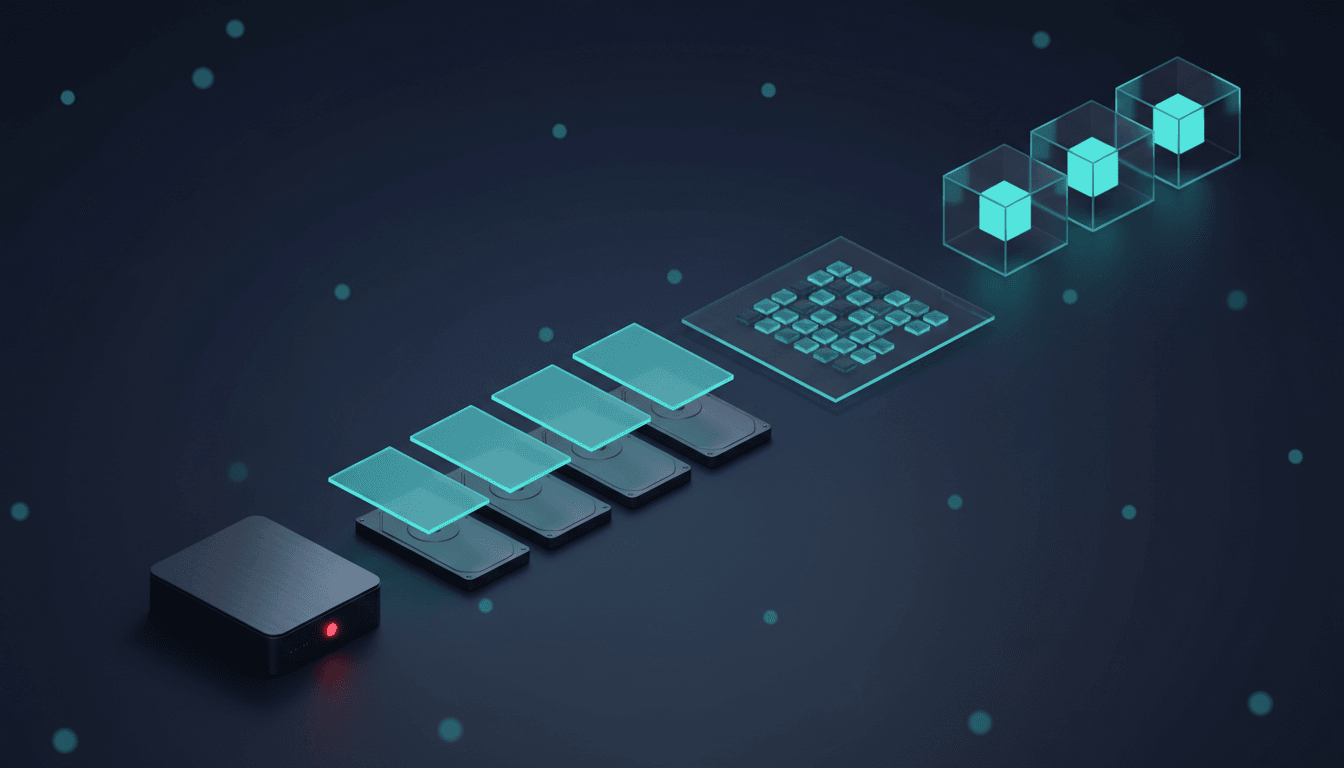
- 01Host & RAID controller
- 02Member drives & RAID 5 stripes
- 03VMFS datastore
- 04Virtual disks & snapshots
- 05Virtual machines
Inside your host
Part 1 of 4
Four servers, one datastore.
Each virtual machine is a set of files on one shared datastore, and the datastore is a single volume on the host’s RAID. Every drive in the host holds a slice of every VM.

Who leads your VM recovery
Viktor Burcevski
Executive Data Engineer / Executive Forensic Consultant
Viktor runs the Brisbane laboratory and leads every virtual machine and server case from the first call: he scopes the host and its storage with you, sets the imaging order for the disks and reviews each rebuild before anything is extracted. When a matter needs evidence handling, he signs the forensic report.
- VMware & Hyper-V
- RAID rebuilds
- Forensic imaging
- Encrypted volumes
What Viktor works on
Datastore and snapshot chain reconstruction from disk images, ransomware cases where the disks must be preserved as evidence, encrypted volumes opened with the client’s own keys, and evidence-grade imaging with hashing and documented chain of custody for matters that may reach an insurer, a solicitor or a court.
FreeAssessment of every disk
92%Recovery rate
15,000+Clients since 2016
4.8★Google rating, 96 reviews
24/7Emergency response
The 20-second answer
Can a failed virtual machine be recovered?
It depends on which layer failed and on what has been written to the storage since. Recovery works from the bottom up: image every disk, rebuild the RAID or LUN, read the datastore, then rebuild each VM. The steps that most often make it worse are the ones that write to the storage: consolidating, rebuilding or running repair tools.
Stop writing to it
No consolidation, rebuild, reformat or restore onto the same storage. Pause the backup jobs that create and delete snapshots.
Image every disk first
Every member disk is copied sector by sector before anything else happens, failed disks included. All further work is done on the copies.
A written quote, then your decision
The free assessment tells you what failed and what the recovery involves. Nothing chargeable starts until you approve the written quote.
How it works
What a virtual machine really is
To its users a VM is just a server. To the host it is a folder of files, stored on a datastore that every VM shares.
The server people use
Windows sees an ordinary C: drive. It has no idea the drive is a file.
A folder of files
- SQL01.vmx settings
- SQL01.vmdk the C: drive
- SQL01-000001.vmdk snapshot
A datastore on a RAID
Shared by every VM on the host and spread across every disk.
01 Symptoms · start here
What is your VM host doing?
Choose the symptom closest to what you have seen. Your selection opens guidance for that fault and carries into the enquiry further down the page. Choosing the hypervisor first makes the guidance specific to how it stores your VMs.
The storage failed. Every VM on it is down.
Leave it as it is · laboratory workThe datastore is missing or inaccessible, the RAID or SAN under the host has failed or is degraded, or disks have dropped out. Every VM on that storage is affected at once, and every write or rebuild attempt changes what can still be read.
Do not rebuild, re-initialise or reformat anything to bring the datastore back, and do not swap disks between bays.
The storage works. One VM’s files are the problem.
Act quickly · stop changing itThe storage is healthy, but one VM has a problem: a failed snapshot consolidation, a VM that started with old data, a deleted VM or virtual disk, a Hyper-V checkpoint that will not merge, or damaged files inside the guest.
Do not retry consolidation, delete snapshot files or point the VM at its base disk to get it running again.
Not one of those two? Choose the closest symptom below.
I don’t know which hypervisor we have
Choose what you see when you manage the VMs. You do not need the host running, or administrator access, to begin an enquiry.
The hypervisor, its version and the storage underneath are the most useful details.
How each platform stores VMs →Know the platform? Pick the one your VMs run onPlatform notes →
Your platform
Which setup is yours?
Tap the setup closest to yours. It sets the hypervisor and the storage; then choose the symptom below.
How each platform stores VMs →Choose a symptom to see your next step.
What goes wrong
How a forgotten snapshot stops every VM
One of the most common VM failures starts with a backup job that does not clean up after itself.
Night 1
A backup leaves a snapshot behind
Snapshot not removed
Week 12
The snapshot grows to 640 GB
DATASTORE96%
Day 85
Datastore full. Every VM pauses.
DATASTOREFULL
Delete the snapshot to free space
The VM starts again with data from night 1.
12 weeks of changes lostStop and image the storage first
The snapshot stays on disk and is merged on the copies.
Changes keptPower cut while the host runs
- What happens
- The datastore comes back damaged and a VM’s disk is missing.
- What we do
- Image the disks, then piece the disk file back together.
A VM deleted by mistake
- What happens
- The files vanish, but the data stays until it is written over.
- What we do
- Find and rebuild the VM from an image of the storage.
Two drives fail in the RAID
- What happens
- The array goes offline and takes every VM with it.
- What we do
- Repair and image every drive, then rebuild the array in software.
Before you try anything
Safe to do. Not safe. Call first.
The aim is simple: leave the laboratory storage that can still be read as it was when it failed.
Safe to do
- Stop changes to the host and the datastore: no new VMs, restores, migrations or updates.
- Pause backup jobs, because backup software creates and removes snapshots on its own.
- Screenshot the snapshot tree, the datastore browser and every error before you close it.
- If the storage is stable, copy (never move) each affected VM folder to other storage.
- Label every disk with its slot or bay number before anything is removed.
Do not do this
- Consolidate, choose Delete All or merge on a broken snapshot chain.
- Re-register the VM or attach its base disk on its own.
- Rebuild, re-initialise or reformat the RAID, the LUN or the datastore.
- Run chkdsk, fsck, VOMA in fix mode, qemu-img check with repair, or a forced ZFS import with rewind.
- Delete delta, .avhdx or ‘orphaned’ files to free space.
Stop and call first
- Ransom notes, renamed files or VMs that will not power on after an attack.
- More than one disk failed, or a rebuild is running or has stopped part-way.
- The datastore is on a SAN or NAS you cannot see into.
- The data may be needed as evidence, for an insurer or in court.
- VMs or guest disks are encrypted and the keys are not to hand.
From the Wildfire lab
Our latest research for virtual machine owners, straight from the bench.
What we are seeing on business systems right now, written up so you can plan before something fails.


02 Costs · Quoted after assessment
How much does VMware data recovery cost?
Virtual machine recovery is quoted in writing after a free assessment, before any chargeable work. These are the things that decide the price.
How many disks, and their condition
Healthy disks image quickly; damaged ones need laboratory work first.
The array or LUN layout
A lost configuration has to be worked out from the data.
The datastore file system
Storage spread over several hosts is more work than one local RAID.
The state of each VM’s disks
Thick or thin, how many snapshots, and any broken links.
What you need back
Whole bootable VMs, single disks, or specific files and databases.
Encryption
Encrypted VMs, BitLocker guests or ransomware. The keys you hold matter.
How urgently you need it
Priority handling is agreed and priced in the quote.
Evidence handling
Hashed imaging and chain of custody, quoted separately.
Free assessment. Written quote. Your decision.
The assessment establishes what failed and what the recovery involves. Nothing chargeable starts until you approve the written scope and fees. Request my free assessment →
Before you decide
Is virtual machine recovery worth it?
It depends on what the VMs hold and what else you have. These are the usual answers.
When the VMs hold the only copy
Usually worth an assessment: it is free and shows what can be read before you spend anything.
When a backup exists but is old or untested
Restore and check it first. If weeks are missing, recovery can target just those VMs.
When the business is stopped
Ask about priority handling. The VMs you need most can come back first.
03 Process · Inside the lab
From failed disks to working VMs, in four steps.
The work runs from the bottom of the storage up. Each step is checked before the next begins, and nothing chargeable starts without your written approval.
- 01The host arrivesEvery disk labelled by its bay. The assessment is free.
- 02Every disk is copiedDamaged disks are repaired first. All later work uses the copies.
- 03The storage is rebuiltRAID, LUN or pool, then the datastore, rebuilt from the copies.
- 04The VMs come backSnapshot chains merged on copies, files checked, then returned.
04 Laboratory
The engineers who will handle your VMs.
Three engineers, one Brisbane laboratory, no account managers in between. The person who assesses your disks is the person who works on them and the person you can ring back.
Viktor Burcevski
Executive Data Engineer / Executive Forensic Consultant
Leads every virtual machine and server case and signs the forensic reports when a matter needs evidence handling.
- VMware & Hyper-V
- Forensic imaging
- Encrypted volumes
What Viktor works on
Datastore and snapshot chain reconstruction, ransomware cases where the disks are preserved as evidence, and evidence-grade imaging with hashing and documented chain of custody.

Martin Daniels
Electrical Engineer
On VM and server jobs he handles the hardware under the datastore: failed disks, controller faults and power damage.
- RAID & NAS
- PCB repair
- Power faults
- Donor matching
What Martin works on
Member disks that will not spin up or identify, ROM transfers so a donor board addresses the right platters, and multi-disk array reconstruction when the controller has lost the geometry, so the datastore can be read from the images.

David Williams
Co-founder · Mobile & Encryption
Co-founded Wildfire in 2018. On VM jobs he opens the encrypted volumes found inside recovered virtual disks.
- Encryption
- BitLocker
- Phones & tablets
What David works on
BitLocker volumes inside Windows guests opened with the client’s recovery keys, encrypted phones and tablets, and the honest conversations about what an encrypted device can and cannot give up without its key.
“Excellent Data Recovery and re set up. Viktor goes above and beyond to explain everything regardless of how long it takes. After disasters through the years gone by with other so-called experts, it was stessfree and a relief to discover Wildfire. Excellent pricing and communication.”
“I hit the worst-case scenario with BitLocker locking me out completely a problem that could’ve cost thousands. Viktor stepped in and had it fixed in mere minutes. He didn’t just fix it; he guided me step-by-step exactly what to do.”
Choosing a laboratory for a VM outage
Four questions to ask any lab before you send the disks.
Do you image every disk before rebuilding?
It should be yes, every time. Working on the original disks risks the only copy.
Can you read our datastore type?
Ask by name: VMFS, ReFS, ZFS, LVM-thin, Ceph or vSAN.
Who will work on it, and where?
At Wildfire it is one of the three engineers above, in Brisbane. Nothing is sent offshore.
Can you keep it as evidence?
After ransomware or a dispute, ask for hashed imaging and chain of custody.
05 Start
Start your virtual machine recovery.
Describe what you have seen and the VMs you need most. Your selections from this page are carried into the enquiry for you to check.
Written scope and fees before recovery.
The assessment is free. Submitting this enquiry does not authorise chargeable recovery work.
Systems down right now?
1300 806 55706 Delivery
Send every disk, labelled by slot.
The VMs are rebuilt from all the disks together, so the order they sat in matters. Request your free Express post-in label first.
Send every disk, labelled
Every disk from the array, failed ones included, each labelled with its bay number. Not just the bad ones.
Wrap each disk on its own
Anti-static bag, wrapped on its own, in a rigid box with 5 cm of cushioning all round.
Add the case details
Your contact details, the hypervisor, the RAID level if known and the VMs that matter most. Never a password or key.
Seal, label and track
Seal the box, attach the supplied label and keep the tracking details.
SAN, NAS, blade chassis or cluster?
Call 1300 806 557 before packing anything, so the right disks are sent in the right order. Do not power-cycle, reseat or reorder disks.
Passwords and encryption keys
Never pack logins or keys with the disks or put them in the enquiry. The laboratory arranges a secure way to receive them. Encrypted-drive recovery →
Need the disks kept as evidence?
Tell us before intake. Chain of custody and evidence-grade imaging are scoped and quoted separately. Discuss digital forensics →
Tick the checks as you prepare the parcel.
07 Answers
Virtual machine recovery questions.
Open a question for a direct answer. What can be recovered depends on the hypervisor, the storage underneath and what has happened to it since the failure.
What is VMware data recovery?
Recovering virtual machines, virtual disks or the files inside them from a VMware ESXi or vSphere environment when VMware’s own tools cannot: the datastore will not mount, a snapshot chain is broken, a VM was deleted, or the RAID or SAN underneath has failed. VMware Technical Support does not recover lost data itself; its knowledge base refers customers to data recovery companies. The work starts with images of the disks, never with repairs on the original storage. The storage layers under a VM →
How much does virtual machine data recovery cost?
It is quoted in writing after a free assessment, before any chargeable work. The price depends on how many disks there are and their condition, the RAID or LUN layout, the datastore type, the state of each VM’s snapshot chain, what you need back, any encryption, how urgently you need it and whether evidence handling is required. What decides the cost →
How long does VM recovery take?
The assessment is usually completed within a few business days of the disks arriving, and urgent cases can be prioritised. After that, the time depends mostly on how many disks there are, how large they are and their condition, because each one is imaged in full before the rebuild. The written quote gives the proposed timing.
Can you recover a VM without a working ESXi or Hyper-V host?
Yes, in most cases the host itself is not needed. The VMs are read from images of the disks on our own equipment, so a host that will not start, or has been reinstalled, does not stop the recovery. Some storage depends on its controller, enclosure or encryption keys; call first and we will say exactly what to send.
Why is my ESXi datastore missing after a reboot?
The host can no longer read the volume the datastore lives on. The usual causes sit underneath VMware: a RAID that dropped a disk or lost its configuration, a SAN LUN that is no longer presented, or a path or driver change after an update. Less often the VMFS metadata itself is damaged. Creating a new datastore on the device erases the old one, so find the failed layer first.
What does “consolidation is needed” mean?
A snapshot delete or consolidation did not finish, so the VM is still running on delta files that should have been merged into its base disk. Retrying can work when the storage is healthy and has space. When it keeps failing, the chain usually has a missing, locked or damaged link, and forcing it can merge the wrong data. How snapshot chains break →
What happens if I delete a snapshot in VMware?
Deleting a snapshot in Snapshot Manager does not delete your data: it merges the changes held in that snapshot’s delta file into the disk above it. On a healthy chain this is routine. On a broken chain or a full datastore the merge can fail part-way. Deleting the delta file itself from the datastore is different: that throws away every change made since the snapshot.
Can data be recovered from a VMDK or VHDX file?
Usually the file is the starting point, not the problem. A virtual disk holds its own partitions and file system, so once it can be read, its files, databases and mailboxes can be extracted. When the VMDK or VHDX is itself damaged, deleted or part of a broken chain, it is rebuilt from the datastore first.
Can you recover a virtual machine remotely?
No. We do not connect to your host or run recovery tools over a remote session. The disks come to our Brisbane laboratory from anywhere in Australia, because many VM failures start with a physical fault in a drive or controller, and every disk has to be imaged on our own equipment before anything else is tried. Working only on those images also means nothing is written to your original storage. How to send the disks →
Should we rebuild the RAID to get the datastore back?
Only if every VM on it is also in a backup you have tested. A rebuild reads every remaining disk end to end under full load, and if another disk is weak, that is when it fails. If the VMs matter and there is no tested backup, have the disks imaged first and rebuild afterwards. RAID data recovery →
Should I try VMDK repair software first?
Only on a copy, and only when the storage underneath is healthy. Copy the whole VM folder to other storage and run the tool against the copy. Never run repair or recovery software against the only copy, on the datastore itself, or on a host whose disks are failing: software cannot fix a hardware fault, and every attempt reads or writes the failing storage again.
How do I recover a deleted virtual machine?
Stop writing to that datastore straight away: no new VMs, clones or restores onto it. A deleted VM’s files can often be found again from the datastore’s metadata and blocks while they have not been reused, but every write, and automatic space reclamation on thin or SSD storage, reduces what is left. Thin provisioning and deleted disks →
Our VM came back with old data. Is the newer data gone?
Not necessarily. This usually means the VM was attached to its base disk and skipped the snapshot files that held the newer changes. If those files are still in the VM’s folder and intact, the chain can be rebuilt on copies. Shut the VM down and do not delete anything in its folder. How snapshot chains break →
Can you recover VMs encrypted by ransomware?
Sometimes. It depends on how much of each virtual disk was encrypted. Some attacks encrypt only the VM configuration files, or only parts of each large disk, and the rest can then be read from images. We cannot decrypt files encrypted with an attacker’s key. Isolate the hosts, keep every disk as it is, report the attack at cyber.gov.au and call before restoring anything. Ransomware on a hypervisor →
Do you recover Hyper-V, Proxmox, KVM and other platforms?
Yes. We work with VMware ESXi and vSphere, Microsoft Hyper-V, Proxmox VE and KVM, vSAN, Ceph, Nutanix, XCP-ng and other hypervisors. Each stores VMs differently, so tell us the platform and version in the enquiry. How each platform stores VMs →
Can you recover one file or database from inside a VM?
Yes. Once the virtual disk can be read, its guest file system is treated like any other drive, so single folders, SQL Server databases, Exchange mailboxes or accounting files can be extracted without bringing the whole VM back. Tell us what matters most in the enquiry.
Can our IT provider deal with you directly?
Yes. Your IT provider can make the enquiry, join the scoping call and receive the technical findings. Anything chargeable still needs your written approval of the quote.
Can the disks be handled as evidence?
Yes. VM and server cases can be handled with chain of custody and evidence-grade imaging: the disks are imaged read-only, hashed and documented, and recovered material is reported separately from what was simply located. Tell us before intake, because the scope and fees are agreed in advance. Digital forensics →
Is our data kept confidential?
Your data stays in Australia, on our own equipment in the Brisbane laboratory. Nothing is sent offshore or stored in a third-party cloud as part of the recovery. Working copies are destroyed after the verification window, or earlier on request with a certificate of destruction.
08 Learn
Understand what failed.
How snapshot chains break, why full datastores pause VMs, what ransomware does to a hypervisor, and where each platform keeps your VMs.
Snapshots and checkpoints
How snapshot chains break.
A snapshot freezes a virtual disk and sends every new write to a delta disk that depends on it. Each later snapshot adds another link. The VM can only be read through every link in order, from the base disk to the newest delta.
Read more
Every link present and in order
- The base disk has not changed since the first snapshot was taken.
- Each delta disk points to its parent, and the identifiers match.
- Deleting or consolidating merges the deltas back into the base disk.
One link missing, damaged or out of step
- A delta file was deleted to free space, or damaged when the datastore filled.
- The VM was pointed at its base disk and wrote to it, so the deltas no longer match.
- A consolidation or merge stopped part-way and left the chain half merged.
Space
Thin provisioning and full datastores.
Thin disks take space only as data is written, so a datastore can promise its VMs more space than it has. Snapshots grow the same way. When the space runs out, the VMs that need to write are paused with a no-space message until space is freed.
Read more
All the space reserved up front
The whole disk is allocated when it is created, usually in one piece. A deleted thick disk is often easier to find again, because its blocks sit together.
Space taken as it is written
Blocks are allocated as data arrives, so a thin disk is often scattered across the datastore. Recovering a deleted thin disk can mean rebuilding it from its blocks.
Ransomware
Ransomware on a hypervisor.
Attacks on ESXi and other hypervisors encrypt the VM files on the datastore, so every server on the host stops at once. They do not always encrypt everything: in the 2023 ESXiArgs attacks, the US Cybersecurity and Infrastructure Security Agency reported that the configuration files were encrypted while the flat disk files could be used to rebuild the VMs.
Read more
First, isolate
Disconnect the affected hosts and storage from the network. Power down only if they cannot be isolated, because evidence held in memory is lost at power-off.
Then preserve
Keep every disk as it is, with the ransom notes and renamed files. Do not wipe, reinstall or restore over the storage. The disks are imaged first, with chain of custody if the matter may reach an insurer or a court.
Then report
Report the attack to the Australian Signals Directorate through ReportCyber at cyber.gov.au. If personal information is involved, the Notifiable Data Breaches scheme run by the OAIC may apply. Payment reporting and breach deadlines: ransomware data recovery.
Where the VMs live
VMFS, NFS and other datastores.
The type of datastore decides where recovery starts and which disks have to be sent.
Read more
VMFS on local RAID or a SAN LUN
Block storage formatted by VMware. Recovery starts with the disks of the RAID or the SAN, then reads VMFS from the rebuilt volume.
NFS on a NAS
The VM files sit in an ordinary folder on the NAS’s own file system. Recovery is a NAS recovery first: the NAS disks are imaged and its volume rebuilt, then the VM folders are read from it.
NTFS, ReFS and Cluster Shared Volumes
Hyper-V keeps its .vhdx files on Windows volumes, often a Cluster Shared Volume on a SAN that several hosts share.
vSAN, Ceph, Nutanix and Storage Spaces Direct
Each VM’s data is spread across the disks of several hosts. Every host and disk is identified together before anything is removed.
Proxmox VE
Where Proxmox keeps VM settings.
On Proxmox, a VM’s settings and its disks live in different places, and both are needed to bring it back as it was.
Read more
In the cluster database
Each VM’s configuration is a small text file under /etc/pve/qemu-server/, named after the VM’s number. /etc/pve is not an ordinary folder: it is the Proxmox cluster file system, stored in a database at /var/lib/pve-cluster/config.db on every node.
On the storage you chose
qcow2 or raw files on directory storage, volumes in a ZFS pool, thin volumes in an LVM-thin pool, or images in Ceph. These are recovered from images of the disks underneath.
Sources
Where the technical statements on this page come from.
- Broadcom: overview of virtual machine snapshots in vSphere (KB 1015180)
- Broadcom: data recovery services for data not recoverable by VMware Technical Support (KB 1015413)
- Broadcom: storage provisioning and space reclamation in vSphere
- Microsoft Learn: using checkpoints in Hyper-V
- Proxmox wiki: Proxmox Cluster File System (pmxcfs)
- CISA: ESXiArgs ransomware virtual machine recovery guidance (AA23-039A)
- CISA: #StopRansomware Guide
- Australian Signals Directorate: ReportCyber
- OAIC: Notifiable Data Breaches scheme
Sources checked 6 November 2026. Hypervisor messages in the library below each link to the vendor page that documents them.
09 Library
Look up a message. Find your platform.
Search a hypervisor message, a platform or a term. Every message is quoted as the vendor documents it, with a link to that page. Message records can carry the symptom into your enquiry, and platform records can set the hypervisor for your recovery path.
Hypervisor message‘Virtual machine disks consolidation is needed.’VMware vSphere / ESXi · Broadcom KB 414589
- Where you see it
- vSphere Client, VM Summary tab under Issues and Alarms. The Snapshots tab shows 'Consolidation is required' at the top.
- Also shown as
- ‘Consolidation is required’
- What it means
- vSphere's record of the VM's snapshots no longer matches the snapshot files on the datastore, so the VM is still running on leftover delta files that should have been merged into its base disk. Broadcom's fix is the Consolidate action, which needs free datastore space and no other process holding the disk.
- Do not
- Do not delete leftover delta or sesparse files by hand, and do not keep retrying Consolidate if it fails or the datastore is nearly full; copy the VM folder first and find out why it failed.
- Urgency
- Act today: stop changes to the storage, then call
Source checked 6 November 2026 · Bookmark this record
Hypervisor message‘The parent virtual disk has been modified since the child was created’VMware vSphere / ESXi · Broadcom KB 345254
- Where you see it
- Power-on or consolidation failure in the vSphere Client; Content ID mismatch lines in the VM's vmware.log.
- Also shown as
- ‘Failed to open '<virtual machine disk>': The parent virtual disk has been modified since the child was created (18).’; ‘Reason: The parent virtual disk has been modified since the child was created.’
- What it means
- A disk in the snapshot chain changed after the snapshot above it was taken, so the content IDs (CIDs) that link parent and child no longer match and ESXi refuses to open the chain. Broadcom lists interrupted Storage vMotion or migrations, resizing disks that have snapshots, attaching snapshot disks to another VM and manual edits as causes.
- Do not
- Do not consolidate, power on, edit CID values or attach the base disk to another VM until every file in the VM folder has been copied; Broadcom itself says to back up first and warns that power-on makes changes that cannot be reversed.
- Urgency
- Stop: change nothing and call before the next step
Source checked 6 November 2026 · Bookmark this record
Hypervisor message‘Cannot open the disk <disk_name> or one of the snapshot disks it depends on.’VMware vSphere / ESXi · Broadcom KB 313078
- Where you see it
- Power-on failure in the vSphere Client, followed by a second 'Reason:' line.
- Also shown as
- ‘An unexpected error was received from the ESXi host while powering on VM <VM_name>.’; ‘Reason: Cannot open the disk <disk_name> or one of the snapshot disks it depends on.’; ‘Cannot open the disk '/vmfs/volumes/<datastore>/<vm>/<vm>-000001.vmdk' or one of the snapshot disks it depends on.’ (KB 345254 example)
- What it means
- ESXi could not open the VM's disk or one of the snapshot files it relies on, so the VM will not power on. The second 'Reason:' line says why; Broadcom lists a file lock, a modified parent disk, a leftover change tracking file, a missing or corrupt descriptor file, permissions and memory as possible reasons.
- Do not
- Do not re-register the VM, recreate descriptor files or point the VM at the base disk on its own until the reason line has been read and the whole VM folder copied, because skipping the snapshot files discards everything written since the snapshot.
- Urgency
- Stop: change nothing and call before the next step
Source checked 6 November 2026 · Bookmark this record
Hypervisor message‘Failed to lock the file’VMware vSphere / ESXi · Broadcom KB 313078
- Where you see it
- Power-on failure (as the 'Reason:' line under 'Cannot open the disk') or a failed snapshot consolidation task.
- Also shown as
- ‘Reason: Failed to lock the file.’; ‘An error occurred while consolidating disks: Failed to lock the file.’
- What it means
- Another process or host already has the disk file open, so ESXi cannot get the exclusive lock it needs to power on the VM or merge its snapshots. Broadcom names a backup proxy VM that did not release a hot-added disk as a common cause, along with a second VM using the same files or a power-on during a snapshot operation.
- Do not
- Do not delete lock files or other VM files, and do not attach the disk to a second VM to test it; identify which host or VM holds the lock first (Broadcom KB 314365).
- Urgency
- Act today: stop changes to the storage, then call
Source checked 6 November 2026 · Bookmark this record
Hypervisor message‘Inaccessible’ (datastore status)VMware vSphere / ESXi · Broadcom KB 318712
- Where you see it
- vSphere Client storage view and the VM's Datastores tab. The datastore may also show 0 B.
- Also shown as
- ‘Lost Communication’ (datastore status); ‘VMs on the datastore also show as inaccessible’
- What it means
- ESXi has lost access to the storage behind the datastore. Broadcom describes three situations: all paths down (APD, the host cannot tell if the loss is temporary), permanent device loss (PDL, the array reports the LUN as gone), and a LUN that no longer shows a VMFS partition, which Broadcom treats as unrecoverable.
- Do not
- Do not reformat, delete, re-create or resignature the datastore, and do not run repair tools against the LUN, until it has been imaged; Broadcom's answer for a missing VMFS partition is to delete the datastore and restore from backup, which is final if there is no backup.
- Urgency
- Stop: change nothing and call before the next step
Source checked 6 November 2026 · Bookmark this record
Hypervisor message‘All shared datastores failed on the host’VMware vSphere / ESXi · Broadcom KB 371396
- Where you see it
- vCenter Server UI, on the ESXi host Summary page.
- What it means
- vCenter raises this alert when the devices behind the host's shared datastores hit permanent device loss (PDL), or during controller maintenance in HCI setups. Broadcom says it can stay on screen as a stale message after storage is back, with no impact on the VMs.
- Do not
- Do not dismiss it as stale until every shared datastore has been confirmed mounted and browsable from that host; if any is not, treat it as an inaccessible datastore.
- Urgency
- Act today: stop changes to the storage, then call
Source checked 6 November 2026 · Bookmark this record
Hypervisor message‘There is no more space for virtual disk <VM.vmdk>. You might be able to continue this session by freeing disk space on the relevant volume, and clicking Retry. Click Cancel to terminate this session.’VMware vSphere / ESXi · Broadcom KB 318352
- Where you see it
- A question raised on the running VM in the vSphere Client; the VM is paused until it is answered.
- What it means
- The datastore has run out of space, so the VM has been stopped and cannot write to its disk until space is freed. Snapshots make it worse because the delta files keep growing, and Broadcom notes consolidation itself needs spare working space to finish.
- Do not
- Do not free space by deleting snapshot delta files, the .vmsd file or any other VM files, and do not click Cancel, which terminates the VM session; free space elsewhere on the datastore or add capacity, then click Retry.
- Urgency
- Act today: stop changes to the storage, then call
Source checked 6 November 2026 · Bookmark this record
Hypervisor message‘Unable to access file since it is locked’VMware vSphere / ESXi · Broadcom KB 321365
- Where you see it
- Failed consolidation or power-on tasks; often alongside 'Virtual machine disks consolidation is needed'.
- Also shown as
- ‘Disk consolidation for VM <vm_name> has failed: Unable to access file since its locked.’ (spelling as in KB 372336); ‘Unable to access a file since it is locked’ (KB 314365 symptom list); ‘Unable to consolidate virtual machine snapshots due to file lock’ (KB 321365)
- What it means
- The same family as 'Failed to lock the file': a host or process, most often a backup proxy that did not release the disk, still holds it open, so consolidation or power-on cannot go ahead.
- Do not
- Do not delete lock files or snapshot files, and do not reboot hosts at random to clear it; find the lock holder first (Broadcom KB 314365) and release the disk from the backup proxy without deleting it from the datastore.
- Urgency
- Act today: stop changes to the storage, then call
Source checked 6 November 2026 · Bookmark this record
Hypervisor message‘File system specific implementation of LookupAndOpen[file] failed’VMware vSphere / ESXi · Broadcom KB 341656
- Where you see it
- Power-on failure of a cloned VM, and in that VM's vmware.log.
- Also shown as
- ‘Error: File system specific implementation of LookupAndOpen[file] failed.’; ‘vmware.log also shows: Failed to lock the file / Cannot open the disk / Module 'Disk' power on failed.’
- What it means
- In the case Broadcom documents, a cloned VM's configuration file still points at the original VM's disk instead of its own copy, so it cannot open or lock that disk and will not power on.
- Do not
- Do not remove a disk using 'delete from datastore' and do not edit the .vmx without backing it up first; confirm which VMDK each VM should own before changing anything.
- Urgency
- Act today: stop changes to the storage, then call
Source checked 6 November 2026 · Bookmark this record
Hypervisor message‘Delete / Delete All / Consolidate’ (snapshot actions, not an error)VMware vSphere / ESXi · Broadcom KB 342618
- Where you see it
- vSphere Client Snapshots tab or Manage Snapshots; Consolidate is on the VM's Snapshots menu.
- Also shown as
- ‘Delete Snapshot’; ‘Delete All Snapshots’
- What it means
- Delete removes one snapshot by merging its data into its parent. Delete All merges the snapshots above the current state into the base parent disk and removes them all from Snapshot Manager. Consolidate merges leftover delta disks that a failed Delete or Delete All left behind and is what clears 'consolidation is needed'. Broadcom stresses that snapshots are not backups and that running on a snapshot for a long time can cause instability and data loss.
- Do not
- Do not run Delete All or Consolidate on a chain that is already reporting errors (CID mismatch, cannot open disk, missing delta files) or on a nearly full datastore; copy the VM folder first, because these merges write into the base disk.
- Urgency
- Plan the next step before acting
Source checked 6 November 2026 · Bookmark this record
Hypervisor message‘Failed to create VM recovery checkpoint … error code: 32768’Microsoft Hyper-V · Microsoft Learn troubleshooting article
- Where you see it
- Error messages shown by backup software (Microsoft names Veeam, Druva, Rubrik and Veritas) when a Hyper-V backup fails.
- Also shown as
- ‘Could not create backup checkpoint for virtual machine - Error -0x800423F2’
- What it means
- Hyper-V could not create the checkpoint a backup job needs, so the backup did not run. Microsoft links this to VSS writer failures, overlapping backup jobs, orphaned or hidden checkpoints, missing permissions and antivirus interference.
- Do not
- Do not delete .avhdx files or run manual merges to tidy up after failed backups until the VM folder has been copied; Microsoft itself says to back up critical VMs before merges or deletions.
- Urgency
- Act today: stop changes to the storage, then call
Source checked 6 November 2026 · Bookmark this record
Hypervisor message‘The chain of virtual hard disks is broken. The system cannot locate the parent virtual hard disk for the differencing disk.’Microsoft Hyper-V · Archived Microsoft blog on Microsoft Learn
- Where you see it
- Error when a differencing disk (.avhd or .avhdx) is opened or attached; Inspect Disk shows the broken parent link.
- Also shown as
- ‘The differencing chain is broken.’ (Parent field in Hyper-V Manager's Inspect Disk dialog, per the same source); ‘Failed to open virtual disk '%3'. A problem was encountered opening a virtual disk in the chain of differencing disks, '%6': '%4'’ (Event ID 12143, Hyper-V-Worker, archived Windows Server 2008 documentation)
- What it means
- A differencing disk stores the path to its parent disk, and Windows cannot find the parent at that path. Microsoft's archived Event 12143 page gives moving only one of the disks in the chain as an example of how this happens.
- Do not
- Do not merge or delete the differencing disks, reconnect them to a guessed parent, or attach the base VHDX on its own to a new VM; copy every disk in the folder first, because Microsoft warns that linking a child to the wrong parent can cause data loss.
- Urgency
- Stop: change nothing and call before the next step
Source checked 6 November 2026 · Bookmark this record
Hypervisor message‘The chain of virtual hard disks is inaccessible. There was an error opening a virtual hard disk further up the chain.’Microsoft Hyper-V · Microsoft Learn open specification [MS-ERREF] 2.3.1
- Where you see it
- Windows status text returned when a VM's differencing disk chain is opened, usually with the code 0xC03A0019.
- Also shown as
- ‘STATUS_VHD_DIFFERENCING_CHAIN_ERROR_IN_PARENT (0xC03A0019)’
- What it means
- One of the parent disks higher up the checkpoint chain could not be opened, so the whole chain is unusable until that parent is found or its problem is fixed.
- Do not
- Do not merge, delete or reconnect any disk in the chain, and do not attach the base disk on its own; copy every disk in the folder first.
- Urgency
- Stop: change nothing and call before the next step
Source checked 6 November 2026 · Bookmark this record
Hypervisor message‘The chain of virtual hard disks is corrupted. There is a mismatch in the virtual sizes of the parent virtual hard disk and differencing disk.’Microsoft Hyper-V · Microsoft Learn open specification [MS-ERREF] 2.3.1
- Where you see it
- Windows status text returned when a VM's differencing disk chain is opened, usually with the code 0xC03A0017.
- Also shown as
- ‘STATUS_VHD_CHILD_PARENT_SIZE_MISMATCH (0xC03A0017)’
- What it means
- The parent disk and the checkpoint (differencing) disk no longer agree on the disk's size, which means one of them was changed after the checkpoint was taken. The chain is treated as corrupt and the VM will not start.
- Do not
- Do not resize either disk again, merge the chain or force a new parent link; copy every disk in the folder first.
- Urgency
- Stop: change nothing and call before the next step
Source checked 6 November 2026 · Bookmark this record
Hypervisor message‘The chain of virtual hard disks is inaccessible. The process has not been granted access rights to the parent virtual hard disk for the differencing disk.’Microsoft Hyper-V · Microsoft Learn open specification [MS-ERREF] 2.3.1
- Where you see it
- Windows status text returned when a VM's differencing disk chain is opened, usually with the code 0xC03A0016.
- Also shown as
- ‘STATUS_VHD_PARENT_VHD_ACCESS_DENIED (0xC03A0016)’
- What it means
- The parent disk is there, but the Hyper-V process is not allowed to open it. Microsoft's troubleshooting guide lists missing NTFS permissions for the virtual machine accounts as a common cause of Hyper-V storage failures.
- Do not
- Do not merge or rebuild the chain to get around the error; copy the folder first, then fix the permission on the parent disk (Microsoft's guide uses icacls to grant the VM account access).
- Urgency
- Act today: stop changes to the storage, then call
Source checked 6 November 2026 · Bookmark this record
Hypervisor message‘io-error’ (VM run state)Proxmox VE / QEMU-KVM · qemu.org documentation
- Where you see it
- Proxmox VE VM status, and the QEMU run state reported by the QEMU monitor (query-status).
- What it means
- QEMU has paused the VM because a disk operation failed and the disk is set to pause on errors. With QEMU's default write-error setting this happens when the host storage is full, which on Proxmox usually means the LVM-thin pool or ZFS pool behind the VM's disk.
- Do not
- Do not grow the VM's disk, delete VM disks or snapshots at random, or keep resuming the VM to see if it clears; free or add space at the storage level first, because Proxmox warns that data written past a full thin pool's physical limit is corrupt.
- Urgency
- Act today: stop changes to the storage, then call
Source checked 6 November 2026 · Bookmark this record
Hypervisor message‘pool I/O is currently suspended’ZFS (OpenZFS: Proxmox, TrueNAS, Linux) · OpenZFS source code plus openzfs.github.io manual pages
- Where you see it
- Error from zfs and zpool commands; pool state and status/action lines in zpool status.
- Also shown as
- ‘SUSPENDED’ (pool state); ‘status: One or more devices are faulted in response to IO failures.’; ‘action: Make sure the affected devices are connected, then run 'zpool clear'.’; ‘ZFS-8000-HC: ZFS pool I/O failures’ (OpenZFS message ID)
- What it means
- ZFS hit I/O failures it could not recover from, usually lost connection to the disks or all disks failing, and with the default failmode of 'wait' it blocks all reads and writes to the pool until the devices are back and the errors are cleared. Commands and applications that touch the pool can hang.
- Do not
- Do not pull or replace disks, re-create the pool, or try forced or rewind import options to get it back; reconnect the devices, and if 'zpool clear' does not bring the pool back, stop and image the disks before anything else.
- Urgency
- Stop: change nothing and call before the next step
Source checked 6 November 2026 · Bookmark this record
Hypervisor message‘DEGRADED’ (pool or vdev state)ZFS (OpenZFS: Proxmox, TrueNAS, Linux) · openzfs.github.io manual page
- Where you see it
- zpool status and zpool list (health), and the Proxmox and TrueNAS storage screens that show the same state.
- Also shown as
- ‘Sufficient replicas exist for the pool to continue functioning in a degraded state.’ (part of the zpool status text for removed, offline or faulted devices)
- What it means
- One or more disks in a redundant pool are offline, removed or faulted, but enough copies remain for the pool to keep working. The pool has lost some or all of its spare redundancy, so a further disk problem could fault it.
- Do not
- Do not remove or replace any disk until the faulted one has been identified by serial number and there is a current backup; removing the wrong disk from a degraded pool can fault the pool.
- Urgency
- Act today: stop changes to the storage, then call
Source checked 6 November 2026 · Bookmark this record
Hypervisor message‘qcow2: Image is corrupt; cannot be opened read/write’QEMU / KVM (including Proxmox qcow2 disks) · QEMU project source code plus qemu.org documentation
- Where you see it
- When a VM starts or a qemu-img or qemu-io command opens the image for writing.
- Also shown as
- ‘qemu-io: can't open device <path>: qcow2: Image is corrupt; cannot be opened read/write’ (QEMU test output; the prefix depends on the tool); ‘qcow2: Marking image as corrupt: <reason>; further corruption events will be suppressed’ (logged when QEMU first sets the flag)
- What it means
- QEMU found inconsistent qcow2 metadata and set the image's corrupt flag. The qcow2 format says an image with that flag must not be written to except to repair it, so QEMU will only open it read-only.
- Do not
- Do not run 'qemu-img check -r all' (or '-r leaks') on the only copy, and never on an image a running VM is using; copy the image first, because QEMU's own documentation says '-r all' can choose the wrong fix or hide corruption.
- Urgency
- Stop: change nothing and call before the next step
Source checked 6 November 2026 · Bookmark this record
Hypervisor message‘WARNING: Thin pool <pool> data is now <percent>% full.’LVM-thin (Proxmox local-lvm, Linux hosts) · LVM2 project source code plus man7.org manual pages
- Where you see it
- Host system log (journal or syslog) from dmeventd's thin plugin; Data% and Meta% columns in lvs.
- Also shown as
- ‘WARNING: Thin pool <pool> metadata is now <percent>% full.’
- What it means
- dmeventd writes this to the host's system log as the thin pool's data (or metadata) space fills, starting above 80%. When data space reaches 100%, writes queue for up to 60 seconds and then fail, which can pause QEMU VMs on that pool with io-error.
- Do not
- Do not resize VM disks, take new snapshots or run metadata repair tools on the pool before it is imaged; free or add space in the volume group, and treat a full metadata area as a reason to stop and call before anything else.
- Urgency
- Act today: stop changes to the storage, then call
Source checked 6 November 2026 · Bookmark this record
PlatformVMware ESXi and vSphereVMFS or NFS datastores · VMDK disks
- Where VMs live
- A VMFS datastore on the host’s RAID or a SAN LUN, or an NFS share from a NAS
- Disk files
- A .vmdk descriptor and a -flat.vmdk data file for each disk; snapshots add delta disks (SEsparse on VMFS 6)
- Recovery starts with
- Imaging every disk or LUN under the datastore, then reading VMFS from the images
Source checked 6 November 2026 · Bookmark this record
PlatformMicrosoft Hyper-VNTFS, ReFS or Cluster Shared Volumes · VHDX disks
- Where VMs live
- An NTFS or ReFS volume on the host, or a Cluster Shared Volume on shared storage
- Disk files
- A .vhdx (or .vhd) file for each disk; each checkpoint adds an .avhdx differencing disk
- Recovery starts with
- Imaging the disks under the volume, then merging the checkpoint chain on copies
Source checked 6 November 2026 · Bookmark this record
PlatformProxmox VEZFS, LVM-thin, directory or Ceph storage
- Where VM settings live
- /etc/pve/qemu-server/, held in the cluster database /var/lib/pve-cluster/config.db on every node
- Disk files
- qcow2 or raw files on directory storage, ZFS volumes, LVM-thin volumes or Ceph RBD images
- Recovery starts with
- Imaging the disks, assembling the pool or volume group read-only, then extracting each VM disk
Source checked 6 November 2026 · Bookmark this record
PlatformKVM and QEMU with libvirtqcow2 or raw images · XML definitions
- Where VM settings live
- libvirt domain definitions in XML on the host
- Disk files
- qcow2 or raw image files, or logical volumes
- Recovery starts with
- Imaging the host’s disks, then reading the Linux file system or volume group that holds the images
Source checked 6 November 2026 · Bookmark this record
PlatformVMware vSANDistributed across the hosts of a cluster
- Where VMs live
- As objects split into components across the disks of several hosts in the cluster
- Recovery starts with
- Identifying every host and disk together. Nothing should be removed before the call
Source checked 6 November 2026 · Bookmark this record
PlatformCeph RBDDistributed across OSD disks
- Where VM disks live
- RBD images striped as objects across the OSD disks of the cluster
- Recovery starts with
- Identifying the nodes and OSD disks together, with the cluster configuration
Source checked 6 November 2026 · Bookmark this record
PlatformNutanix AHVDistributed storage across nodes
- Where VM disks live
- In the cluster’s distributed storage, spread across the drives of several nodes
- Recovery starts with
- Identifying the nodes and drives together before anything is removed
Source checked 6 November 2026 · Bookmark this record
PlatformXCP-ng and Citrix HypervisorStorage repositories · VHD disks
- Where VM disks live
- On a storage repository: local disks, NFS or iSCSI
- Disk files
- Usually VHD files or logical volumes, depending on the repository type
- Recovery starts with
- Imaging the disks under the repository, then reading each virtual disk from the copies
Source checked 6 November 2026 · Bookmark this record
GlossaryDatastore
VMware’s name for the storage that holds VM files: a VMFS volume on a disk, a RAID or a SAN LUN, or an NFS share. One datastore usually holds many VMs, so one failure can stop them all.
Source checked 6 November 2026 · Bookmark this record
GlossaryVMFS
VMware’s cluster file system for datastores on block storage. Several ESXi hosts can share one VMFS volume on a SAN. VMFS 6 is the current version.
Source checked 6 November 2026 · Bookmark this record
GlossaryVMDK
A VMware virtual disk. On VMFS it is two files: a small text descriptor (.vmdk) and the data file (-flat.vmdk). Snapshots add delta disks that depend on it.
Source checked 6 November 2026 · Bookmark this record
GlossarySnapshot and delta disk
A snapshot preserves a VM’s state at a point in time. After it is taken, writes go to a new delta disk and the disk below stops changing. A snapshot is not a backup: it depends on every disk below it in the chain.
Source checked 6 November 2026 · Bookmark this record
GlossaryConsolidation
Merging snapshot delta disks back into the disk below, so the VM runs on one disk again. vSphere flags a VM when consolidation is needed after a snapshot delete did not finish.
Source checked 6 November 2026 · Bookmark this record
GlossaryThin provisioning
A virtual disk that takes datastore space only as data is written, so a datastore can promise its VMs more space than it has. A thick disk reserves all of its space when it is created.
Source checked 6 November 2026 · Bookmark this record
GlossarySpace reclamation (UNMAP)
Tells thin-provisioned storage which blocks the file system no longer uses, so the storage can reuse them. On VMFS 6 it can run automatically. Blocks that have been reclaimed may no longer hold the deleted data.
Source checked 6 November 2026 · Bookmark this record
GlossaryVHDX and AVHDX
Hyper-V’s virtual disk format (.vhdx) and the differencing disk created for each checkpoint (.avhdx). A differencing disk records changes and depends on its parent.
Source checked 6 November 2026 · Bookmark this record
GlossaryCluster Shared Volume (CSV)
A Windows failover cluster volume that several Hyper-V hosts read and write at the same time, usually on a SAN. VMs on a CSV are recovered from the shared storage, not from one host.
Source checked 6 November 2026 · Bookmark this record
Glossaryqcow2
QEMU’s copy-on-write disk image format, used by KVM and Proxmox. It supports thin allocation, internal snapshots and backing files, so one image can depend on another.
Source checked 6 November 2026 · Bookmark this record
GlossaryZFS pool
ZFS combines disks into a pool and stores VM volumes inside it. A forced import in recovery mode (zpool import -F) returns the pool to an importable state by discarding the last few transactions, which is why it is never run on the original disks first.
Source checked 6 November 2026 · Bookmark this record
GlossaryLVM-thin
A Linux thin pool that Proxmox can use to hold VM disks as thin volumes. Like other thin storage, it can promise its volumes more space than it has.
Source checked 6 November 2026 · Bookmark this record
GlossaryDisk image
A sector-by-sector copy of a whole disk, made before any repair or rebuild. All further work is done on the images, so the original disk is not changed.
Source checked 6 November 2026 · Bookmark this record
GlossaryChain of custody
The documented record of who handled the disks and images, when and how, with hash values showing the copies have not changed. It matters when the data may be evidence.
Source checked 6 November 2026 · Bookmark this record
GlossaryRAID 5
Disks striped with rotating parity, so the array survives the loss of one disk. While degraded it has no protection left, and a rebuild reads every remaining disk in full.
Source checked 6 November 2026 · Bookmark this record
No records match that search. Try a shorter phrase or a single word from the message, or ask us directly.
Ready when you are
Tell us what the host is doing.
We’ll explain the options first.
Free assessment of every disk. Written scope and fees before any chargeable recovery work.