⚠ Do now
Samsung Galaxy · Phones · Tablets · Foldables
Samsung data recovery — every Galaxy ever made
From the original 2010 Galaxy S to the newest Z Fold, and every S, Note, A, J, M, XCover and Galaxy Tab in between — if Samsung built it and your data is on it, our Brisbane bench works on it.
1300 806 557Free diagnostic · Fixed quote · Proof before payment
Google ★ 4.8 — 95 reviews
92% recovery rate
15,000+ clients since 2016
What Samsung owners say on Google
4.8 from 95 reviews
“Absolutely outstanding service from Wildfire Data Recovery! We came to them with several locked Samsung and ZTE mobile phones that we could no longer access due to forgotten or lost PIN codes. From the beginning, their team was incredibly knowledgeable, transparent, and professional. They were able to bypass the lost PIN numbers and also recover them all for us, so we can now use our phones again.”
“Wildfire Data Recovery were fantastic to deal with from start to finish. Extremely responsive to any customer requests and we able to perform data recovery and phone repair where Samsung official repairer advised they would not likely be able to preserve the data. Very satisfied with Viktor and his team. Highly recommend 👌”
“Great communication with fast service, managed to retrieve all family photos and videos off a broken hard drive.”
“Excellent Data Recovery and re set up. Viktor goes above and beyond to explain everything regardless of how long it takes. After disasters through the years gone by with other so-called experts, it was stessfree and a relief to discover Wildfire. Excellent pricing and communication. ☆☆☆☆☆ Highly recommend 👌”
Why Samsung recovery is its own discipline
Samsung has shipped more Android hardware than anyone on earth, and two decades of Galaxys span three completely different recovery worlds. Early and mid-range models store data on eMMC chips with service access points on the board — which means a dead Galaxy is often not a dead end: we can frequently read the storage directly, no boot required. It’s how we’ve recovered phones other shops wrote off, including locked and completely unresponsive handsets.
Modern Galaxys are a different game. From the Knox-hardened generations onward, storage is encrypted per-file and tied to the device’s security hardware — so recovery means making the original board run and unlocking with the owner’s PIN, pattern or password. That’s microscope-and-schematic work, and it’s our daily bread. One more Australian wrinkle: local Galaxys have switched between Exynos and Snapdragon chipsets over the years depending on the generation — the bench handles both, and it’s one of the first things we identify at intake.
And before any invasive work, we check the escape hatches people forget they have: Samsung Cloud, Smart Switch backups on old computers, and the SD card that half of older Galaxys carry. Sometimes the fastest recovery is the one that never needs a screwdriver.
Know your Galaxy
Pick your family, see your odds
Six Galaxy families, six bench realities. Tap yours for how they fail and how they recover — every panel stays readable without JavaScript.
40+ modelsExynos + SnapdragonEvery generation
Galaxy S flagships the volume champions
How they arrive
- Sudden death — charge circuit or PMIC failure, storage untouched
- Smashed AMOLED with everything locked behind it
- Water and salt water — the corrosion clock
- Bootloops after interrupted updates
On the bench
- S → S7 era: largely pre-encryption, direct storage reads even off dead boards
- S8–S10 era: encrypted with hardware access paths still open
- S20 onward: Knox rules — board runs, your code unlocks
- AU Exynos and Snapdragon variants both handled — identified at intake
Full fault-by-fault detail lives on the Samsung Galaxy data recovery page.
14 modelsComplete lineS Pen era
Galaxy Note the S Pen line, first to last
How they arrive
- A decade of work notes and photos on one handset
- Note4-era bootloops and eMMC wear
- Recalled Note7s still holding 2016’s photos
- Note10/20 with modern-era faults
On the bench
- Treated exactly like S-class flagships of their year
- Note → Note5: direct-read friendly
- Note8 onward: transition into Knox rules
- S Pen data lives in the same storage — the pen changes nothing
Yes — we have recovered recalled Note7s. We would gently suggest recovering yours onto literally anything else.
Fold 1 → 7Book-styleModern era
Galaxy Z Fold the book foldables
How they arrive
- Inner screen delamination along the crease
- Hinge-flex cable failure — screens die, data doesn’t
- Drops on the spine cracking both panels
- Battery swell forcing the chassis open
On the bench
- The board underneath is conventional — modern Knox rules apply
- Bench display fitment replaces the exotic folding panel for extraction
- Hinge and screens are irrelevant to the storage chip
- Same proof-before-payment promise as every phone
Folding screens fail in folding-screen ways — the data sits on a normal board and follows the normal rules.
Flip 1 → 7 + FEClamshellModern era
Galaxy Z Flip the clamshells
How they arrive
- Main screen dead along the fold line
- Cover screen alive, inner screen gone — half a phone
- Hinge dust damage from pockets and beaches
- Split battery cells confusing the power system
On the bench
- Wired display and input paths get us past dead panels
- Board-level work identical to the S-series of the same year
- Dual-battery quirks diagnosed on the bench supply
- Your code unlocks; extraction is standard from there
Flips outsell Folds in Australia — and outnumber them on the bench for exactly the screen faults above.
Every model2014 → todayXCover too
Galaxy A, J, M & XCover what Australia actually carries
How they arrive
- Charge-port wear — the budget-phone classic
- Weaker water sealing than the flagships
- Drops without cases (cases cost a third of the phone)
- Years of family photos and zero backups
On the bench
- eMMC storage runs deep into the 2020s here — direct reads on many dead units
- Cheapest phones often carry the BEST recovery odds
- XCover rugged models: same board rules in a tougher shell
- SD cards imaged first — sometimes the whole job is on the card
The phone’s price has nothing to do with what the photos on it are worth.
Every TabTab S · A · ActiveTablets
Galaxy Tab the family memory keepers
How they arrive
- Won’t charge — worn port after years plugged in
- Bent in a schoolbag, cracked joints under the big chips
- Kids’ tablets with long-forgotten PINs
- Drawer Tabs holding five years of family photos
On the bench
- Port and charge-circuit repair — data was never in danger
- Bend stabilisation and reflow under the microscope
- Older Tabs: direct storage reads even when dead
- School-issued Tabs: MDM checked before anything else
Tablets get their own deep-dive on the Samsung tablet data recovery page.
The full index
Every Samsung we recover
Every Galaxy line Samsung has shipped, grouped the way the bench sees them. Find yours — and if a brand-new release isn’t listed yet, we already work on it.
Galaxy S — the flagships
2010 → todayEvery S-series flagship Samsung has made. Grouped by bench era — the grouping that decides the recovery method.
The early flagships
2010–2016Largely pre-encryption with directly readable storage — the most forgiving Galaxys ever made.
Galaxy S (2010)
Galaxy S II (2011)
Galaxy S III (2012)
Galaxy S4 (2013)
Galaxy S5 (2014)
Galaxy S6 (2015)
Galaxy S6 edge (2015)
Galaxy S6 edge+ (2015)
Galaxy S7 (2016)
Galaxy S7 edge (2016)
Infinity era
2017–2019Encryption standard, hardware paths still open on many — locked and dead units from these years recover well.
Galaxy S8 (2017)
Galaxy S8+ (2017)
Galaxy S9 (2018)
Galaxy S9+ (2018)
Galaxy S10e (2019)
Galaxy S10 (2019)
Galaxy S10+ (2019)
Galaxy S10 5G (2019)
Modern era
2020–2025Knox-hardened, per-file encryption — board runs, your code unlocks. Includes every FE and Edge variant.
Galaxy S20 / S20+ / S20 Ultra (2020)
Galaxy S20 FE (2020)
Galaxy S21 / S21+ / S21 Ultra (2021)
Galaxy S21 FE (2022)
Galaxy S22 / S22+ / S22 Ultra (2022)
Galaxy S23 / S23+ / S23 Ultra (2023)
Galaxy S23 FE (2023)
Galaxy S24 / S24+ / S24 Ultra (2024)
Galaxy S24 FE (2024)
Galaxy S25 / S25+ / S25 Ultra (2025)
Galaxy S25 Edge (2025)
Galaxy S25 FE (2025)
Galaxy Note
2011–2020 · complete lineThe S Pen line, first to last. Note data lives in the same storage as everything else — the pen changes nothing on the bench.
Every Note
2011–2020Yes, including the recalled Note7 — we’ve recovered those too. If you still carry one, we’d gently suggest recovering it onto literally anything else.
Galaxy Note (2011)
Galaxy Note II (2012)
Galaxy Note 3 (2013)
Galaxy Note 4 (2014)
Galaxy Note Edge (2014)
Galaxy Note5 (2015)
Galaxy Note7 (2016)
Galaxy Note FE (2017)
Galaxy Note8 (2017)
Galaxy Note9 (2018)
Galaxy Note10 (2019)
Galaxy Note10+ (2019)
Galaxy Note20 (2020)
Galaxy Note20 Ultra (2020)
Galaxy Z — the foldables
2019 → todayFolding screens fail in folding-screen ways — hinge-flex cable damage and display delamination — but the data sits on a conventional board underneath, and that board follows the modern-era rules.
Every Fold and Flip
2019–2025Both lines complete, first generation to current.
Galaxy Fold (2019)
Galaxy Z Flip (2020)
Galaxy Z Fold2 (2020)
Galaxy Z Fold3 / Z Flip3 (2021)
Galaxy Z Fold4 / Z Flip4 (2022)
Galaxy Z Fold5 / Z Flip5 (2023)
Galaxy Z Fold6 / Z Flip6 (2024)
Galaxy Z Fold7 / Z Flip7 (2025)
Galaxy Z Flip7 FE (2025)
Galaxy A, J, M & XCover — the everyday Galaxys
2014 → today · every modelThe phones most of Australia actually carries. Every model in these lines is covered — the chips below are series markers, not an exhaustive menu.
Every budget and mid-range line
2014–2025Many of these keep directly readable storage well into the modern era — dead ones recover more often than their owners expect. XCover rugged models included.
Galaxy A series 2014–2018 (A3 → A9)
Galaxy A series 2019 (A10 → A90)
Galaxy A series 2020–2022 (A11 → A73)
Galaxy A series 2023–2025 (A05 → A56)
Galaxy J series (J1 → J8)
Galaxy M series (M10 → M55)
Galaxy XCover rugged line
Galaxy Core / Grand / Ace legacy lines
Galaxy Tab — every tablet
2010 → todayTablets arrive with charging-port wear, bends and drops. Same board-level bench, bigger boards, same rules by era.
Tab S flagships
2014–2025The premium line, complete.
Galaxy Tab S (2014)
Galaxy Tab S2 (2015)
Galaxy Tab S3 (2017)
Galaxy Tab S4 (2018)
Galaxy Tab S5e (2019)
Galaxy Tab S6 / S6 Lite (2019–20)
Galaxy Tab S7 / S7+ / S7 FE (2020–21)
Galaxy Tab S8 / S8+ / S8 Ultra (2022)
Galaxy Tab S9 family (2023)
Galaxy Tab S10+ / S10 Ultra / S10 FE (2024–25)
Galaxy Tab S11 / S11 Ultra (2025)
Tab, Tab A & Active lines
2010–2025The originals, the family workhorses and the rugged Actives — all covered.
Galaxy Tab 7.0 (2010)
Galaxy Tab 2 / 3 / 4 lines (2012–14)
Galaxy Tab A 8.0 / 9.7 / 10.1 (2015–19)
Galaxy Tab A7 / A7 Lite (2020–21)
Galaxy Tab A8 (2022)
Galaxy Tab A9 / A9+ (2023)
Galaxy Tab A11 / A11+ (2025)
Galaxy Tab Active rugged line
Model not listed? Samsung has shipped thousands of variants and we’re not going to pretend to type them all — if it says Samsung on the back, from a Galaxy Ace to yesterday’s release, the bench takes it. Call 1300 806 557 and tell us what you’ve got.
Inside your Galaxy
The board your data actually lives on
Tap a hotspot. Six components decide almost every Samsung recovery — and only one of them holds your data.
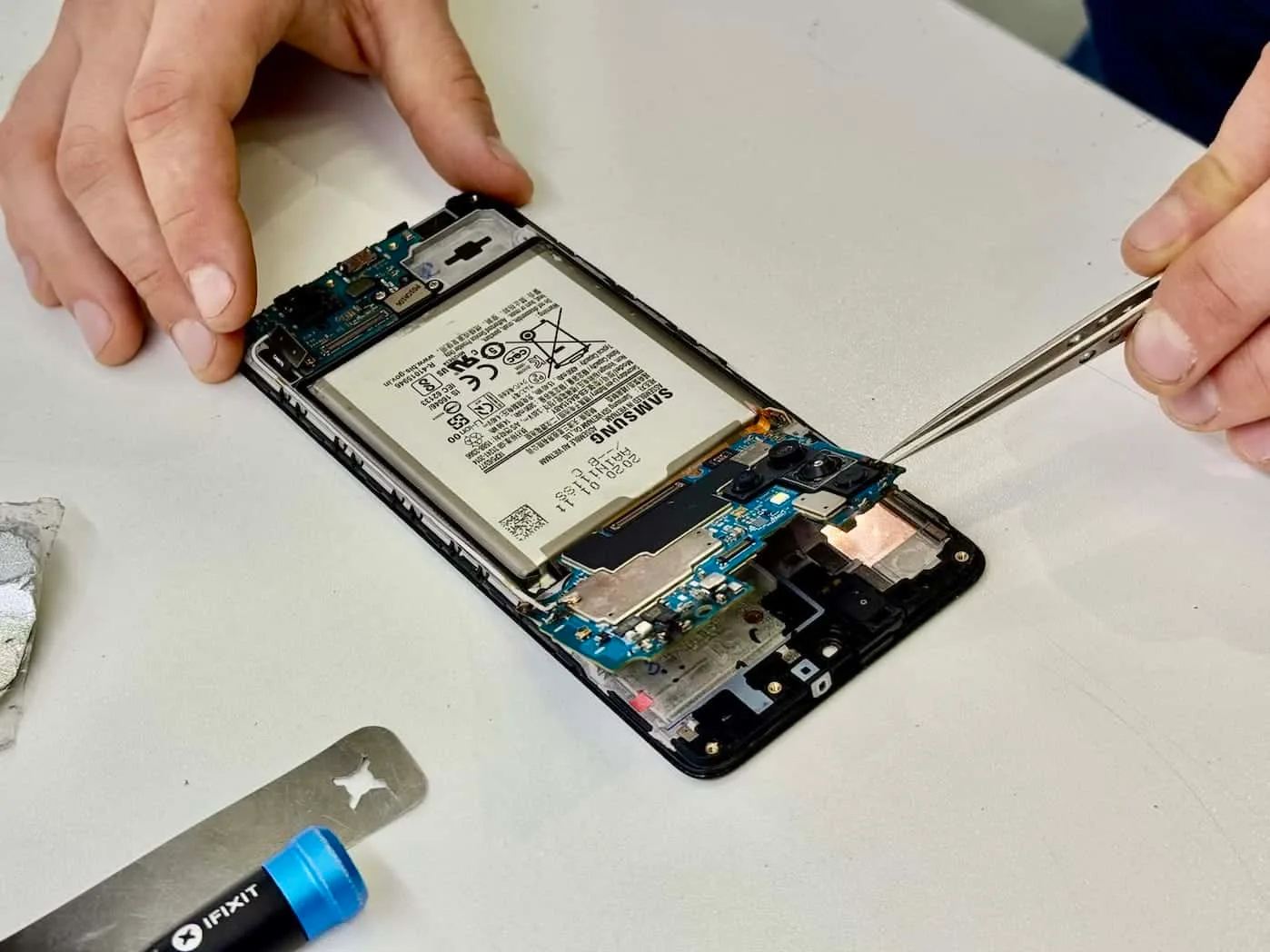
UFS / eMMC storage 1/6
Where your data lives
Every photo and message sits in this one chip. eMMC-era Galaxys expose service access to it — we can often read it directly, even off a dead board. UFS-era chips are faster and more locked-down.
What we do about it
Direct reads on eligible models; otherwise the board is repaired until this chip can be read in place.
SoC — Exynos or Snapdragon 2/6
The processor and the keys
Australian Galaxys have shipped with both chipsets over the years. On Knox-era models the encryption keys live in here, which is why chip-swapping storage to another phone can’t work.
What we do about it
We identify the chipset at intake — it decides the exact bench method for your model.
Power management (PMIC) 3/6
The usual sudden-death suspect
The PMIC sequences a dozen power rails at boot. When it fails, the phone looks stone dead while the storage sits untouched millimetres away.
What we do about it
Diode-mode measurement against known-good boards finds the failed rail; the component is replaced under the microscope.
USB & charging circuit 4/6
Wear item number one
Charge ports and their circuits wear out with daily use — and take lightning-strike-grade damage from cheap car chargers. “Won’t charge” is a power problem, not a data problem.
What we do about it
Port replacement or charge-circuit repair restores power; the data was never in danger.
Display & connectors 5/6
The window, not the vault
A dead or smashed AMOLED takes away your access, not your data. Drop damage can also unseat connectors, which mimics far scarier faults.
What we do about it
A known-good display is fitted on the bench so the phone can be unlocked and extracted normally.
SIM / SD reader 6/6
The free win
Many Galaxys carry an SD card that holds the photos. The reader itself rarely fails — but bent trays and corrosion here can stop boot on some models.
What we do about it
SD cards are imaged separately first — sometimes the whole job is already on the card.
Why the era matters
How your Galaxy’s generation shapes the job
Same lab, same engineers, same proof-before-payment promise — different physics depending on when your device was built.
2010–2015 · open era
Direct storage access
Most of these Galaxys pre-date default encryption, and their eMMC storage has service access points on the board. Even a dead board can usually be read directly — drawer finds from this era recover beautifully.
2015–2019 · transition era
Encrypted, with hardware paths
Encryption becomes standard, but hardware-level access paths remain on many models and the lock code unlocks the rest. Locked and dead phones from these years are still very much in play.
2019 onward · Knox era
Board runs, code unlocks
Per-file encryption tied to Knox security hardware — the board must run and the owner’s code is the key, the same honest rule as modern iPhones. Board-level repair to a running state is exactly what our bench does.
Before you touch anything
Five well-meant moves that kill Samsung data
Flip each card. Every one of these arrives on our bench weekly — usually after the advice worked for somebody on a forum in 2019.
Start with your problem
What happened to yours?
Fault-by-fault guides — the do-now steps, the bench process and the honest odds for each failure.
Broken screen
Smashed glass or dead touch on any brand — the data underneath survives.
Open the guideWater damage
Corrosion is on the clock — what to do right now, and what we do next.
Open the guideWon’t turn on
Dead phone, living data. Power faults are our bread and butter.
Open the guideLocked phone
Forgotten PINs and locked devices — what’s honestly possible, with proof of ownership.
Open the guideDeleted data
Deleted photos, messages and files — where copies survive and what’s truly gone.
Open the guideAll Android brands
Pixel, OPPO, Motorola, Xiaomi and every other Android — the full brand index.
Open the guideTransparent from the start
What it costs
Diagnosis first, fixed quote second, and you approve everything before recovery work starts. No data, no recovery fee.
Standard assessment
Free
3–5 business days
Full diagnostic on your device, a written report of what failed, and a fixed recovery quote. You decide from there — no obligation.
Critical priority
$715 inc. GST
$650 + GST · 24–48 hours
Your device goes to the front of the queue with an engineer assigned same-day. For work deadlines, legal matters and can’t-wait situations.
Emergency 24/7
$1,400
Around the clock
We start immediately and work continuously until it is done — nights, weekends and public holidays included.
Priority fees cover the expedited service; the recovery quote itself depends on what your device needs and is fixed in writing before any work begins.
Straight answers
Samsung questions, answered straight
Can you recover data from any Samsung ever made?
Yes — from the original 2010 Galaxy S through the current S25 family and Z Fold7/Flip7, plus every Note, every A/J/M model and every Galaxy Tab. The approach changes by era: older models often allow direct storage reads even off a dead board, while modern Knox-era devices need board-level repair plus your lock code. Every generation has a path.
My Samsung is completely dead. Is the data gone?
Usually not. On many older and mid-range Galaxys we can read the eMMC storage directly through service access points — no boot required. On modern models the path is repairing the board to a running state. Either way, a dead Samsung is a diagnosis, not a verdict — and the diagnosis is free.
I’ve forgotten the PIN on an old Samsung. Can you get my photos?
Often, yes — with proof of ownership. On pre-encryption and many transition-era Galaxys the storage can be accessed at hardware level regardless of the lock. On recent Knox-era models the code is the encryption key and honest answers get more limited — we’ll assess yours and tell you straight. We recover data for owners only.
Samsung said the motherboard needs replacing. Doesn’t that mean my data’s gone?
No — it means their repair path is replacement, which gives you a working phone with none of your data. Data recovery has a different goal: we repair the original board just far enough to extract everything. Plenty of our Samsung recoveries arrive with a replacement quote from an authorised repairer in hand.
Do you work on both Exynos and Snapdragon Galaxys?
Yes. Australian-market Galaxys have shipped with both chipsets over the years, sometimes changing generation to generation, and the bench work differs slightly between them — we identify which you have at intake and proceed accordingly. It affects the method, never the promise: fixed quote, proof before payment.
What about Galaxy Tabs?
Every generation, from the original 2010 Tab to the current Tab S line and every Tab A between. Tablets mostly arrive with charging-port failures, bent chassis or drop damage — bread-and-butter board work, same rules as the phones.
Speak bench
The Samsung recovery glossary
Nine terms you’ll hear from us (or a forum) — in plain English, so every quote you get makes sense.
eMMC
The soldered storage chip in older and budget Galaxys. Exposes service access points on the board — the reason dead older Samsungs are so recoverable.
UFS
The faster storage standard in modern Galaxys (roughly S6 onward for flagships). Quicker for extractions, more locked-down for direct access.
ISP
In-System Programming — reading a storage chip through test points on the board while it stays soldered in place. A dead board’s escape hatch.
Test point
A tiny exposed pad on the board that lets bench equipment talk to the chipset directly, below the operating system.
Knox
Samsung’s security platform. Knox-era Galaxys tie file encryption to hardware — the reason modern recoveries need the board running plus your code.
FBE
File-Based Encryption — every file wrapped with its own key, standard on modern Androids. Your PIN, pattern or password is part of the key.
Odin
Samsung’s firmware-flashing tool. Brilliant for repairs, lethal for data — one wrong option re-partitions the phone.
Download mode
Samsung’s built-in service mode for receiving firmware. We use it for diagnosis; forums use it for flashing. See Odin.
FRP
Factory Reset Protection — the Google account lock after a reset. Anti-theft by design; we work with owners and proof of ownership only.
Whatever Galaxy you’ve got, we’ve met it before
Free diagnostic, a fixed quote in writing, and proof of your recovered files before you pay a cent — from a 2010 Galaxy S to yesterday’s release.