⚠ Do now
Phone won’t turn on or charge? Dead phone data recovery, Brisbane.
Stuck on the logo, or dead after a drop? The photos are almost always still on it.
Dead phone data recovery starts with good news: when a phone won’t start, what it has usually lost is power. Your photos and messages sit encrypted on the storage chip, with the key built into that phone’s own processor, so they wait on the original board until it can start again. We repair the battery connection, charging circuit, power chip or board on the original phone, start it, and you unlock it so the data can be copied. Any make, assessed free at our Brisbane lab.
- Free assessment, nothing to pay if there is no route
- Your phone’s own chips, kept together, never a replacement
- Samsung, Pixel, iPhone and every other Android
- Our copies wiped 14 days after delivery
- 01Battery, the usual reason a phone won’t start
- 02Power chip, which shares the battery out
- 03Processor, with the key unique to this phone
- 04Storage chip, your photos and messages
Inside the phone
Part 1 of 4
Most dead phones have lost power, not data.
A flat or worn battery, a charging port full of lint or a failed cable stops the phone before anything else does. Nothing on the storage chip is touched.

Who reviews your dead phone case
Viktor Burcevski
Executive Data Engineer / Executive Forensic Consultant
Before anything is quoted, Viktor looks at every dead phone himself: is it the battery, the charging circuit, the power chip or the board, and what will it take to start it once? If a new battery from a repair shop will do, he says so.
- Fault diagnosis
- Power faults
- Board-level repair
- Data checks
What Viktor works on
Phones that died after a drop, an update or a swollen battery, phones a shop offered to replace, and old phones that wouldn’t start after years in a drawer, always on the original board, where the key to the data lives.
1 hrApple’s charge before you try again
7 secGalaxy force restart hold
1Button that erases everything: Restore
FreeAssessment, nothing to pay if there is no route
4.8★Google rating, 96 reviews
Start here
Phone won’t turn on or charge? The 20-second answer.
Is my data gone? Usually not. A phone that won’t turn on or charge has lost power, not photos: they sit on the storage chip, locked to that phone’s own board. Phone not charging at all? Try another cable and charger first. If it still won’t start, the original board is started once in the lab, you unlock it, and everything can be copied off.
What should I do right now?
- Hot, swollen or wet? Don’t charge it. Unplug it and leave it on a hard surface.
- Otherwise, charge it for an hour with the maker’s charger, then force restart it.
- Stuck on the logo? On a computer, choose Update, never Restore.
- Offered a new phone or board? Say no until the data is off.
Why won’t my phone turn on or charge?
Most often a worn cable, a blocked charging port or a flat or worn battery; after a drop, water or heat, a power chip or a short on the board. Each one stops the phone, and none of them erases it.
Can I fix it myself?
Sometimes: an hour on the charger and the right force restart bring many phones back. If it is wet, hot, swollen or bent, stop there.
What does it cost?
Nothing to look at it. If the board can’t be started, nothing at all; otherwise a written quote comes first.
01 Symptoms · start here
Why won’t your phone turn on?
Start with the triage, then the two checks every maker recommends before anything else. Or pick the situation closest to yours below; your choice carries into the enquiry form.
Dead phone triage
What stopped it, and what does it do now?
Two answers point to the most likely failed part, what that means for your data, and the first three steps.
Your result appears here once both are answered.
Most likely
Only a guide: the free assessment confirms what failed. Your answers stay on this page and are never sent.
Only need it working again? If everything is backed up, Apple, Samsung or a repair shop can replace the battery or the phone. If it isn’t, ask them first whether the repair keeps the original board, and tell them the data matters.
Safe-to-charge check
Is it safe to charge?
Five quick answers before you plug it in. Any yes means stop.
Has it been wet in the last few days?
Is it hot, or was it hot before it died?
Is the case, back or screen lifting or bulging?
Is it bent, or cracked through the frame?
Any smell, hissing or smoke?
Answer all five to see whether to charge it.
Stop
Don’t charge it
Australia’s consumer watchdog says not to use batteries, products or chargers that are overheating or showing signs of failure, and to call 000 in a fire.
Request my free assessment →Safe to try
Charge it for one hour
Use the maker’s charger and cable in a wall socket. Apple says to charge an iPhone for one hour, then try again.
60:00
- Gets hot on the charger: unplug it and stop.
- A charging sign appears: leave it until the hour is up.
- After the hour: force restart it.
Force restart coach
The right buttons for your phone
Pick your phone. The coach shows the maker’s own steps, and times the hold where the maker gives a time.
Choose your phone to see its steps.
0 of 7 seconds
Logo appeared? Let it finish starting, then back it up straight away. Nothing after two tries? Stop there: more tries won’t help, and a warm phone needs to rest.
Or choose the closest situation below.
I don’t know which phone I have
Look at the back of the phone. The make is enough for now.
The make is enough. The exact model can be confirmed at assessment.
Choose a situation to see your next step.
Update-or-Restore simulator
The button that erases everything
When a phone is stuck, a computer or the phone’s own recovery menu offers choices. Practise here first: pick what you would press.
There’s a problem with the iPhone that requires it to be updated or restored.
Your choice
Pick a button on the left
Nothing here touches a real phone. It shows what each choice does, in the makers’ own words.
Sources: Apple: if you can’t update or restore your iPhone ↗ and Google: reset your Android device ↗. Menu wording differs between makers.
Asked first
The questions people ask about a dead phone
Why will my phone not turn on?
In order of how often: a battery that has run flat or worn out, a charging cable, plug or port that isn’t delivering power, software stuck at the logo, and damage on the board from a drop, liquid or heat. Only the last one needs board work, and none of them erases your data.
How do I recover data from a dead phone?
Check the cloud first: iCloud, Google Photos or Samsung Cloud may already hold the photos. If they don’t, the original phone has to start once so you can unlock it and copy everything. That is the lab’s job: repairing the battery connection, charging circuit, power chip or board on your own phone.
My Samsung phone won’t turn on. What should I try?
Samsung’s own advice: hold the Power (Side) and Volume Down buttons together for at least 7 seconds, and charge it only with a Samsung-approved charger and cable. If it is wet, hot or swollen, skip both and call.
Is a dead phone worth repairing just for the photos?
If the photos aren’t anywhere else, usually yes, because the repair only has to start the phone once. Check the cloud and the family computers first; if everything is there, a new phone is the cheaper answer.
Before you try anything else
Safe to do. Not safe. Call first.
The first column is what Apple, Samsung and Google tell you to try. The second is how most dead phones lose their data.
Safe to do
- Charge it for an hour with the maker’s charger, plugged into the wall.
- Force restart it with the right buttons for your model.
- Look for the photos in iCloud, Google Photos or Samsung Cloud on a computer.
- Unplug it at once if it gets hot.
- Keep every piece if it was dropped.
Do not do this
- Choosing Restore on a computer, or a factory reset from the recovery menu.
- Accepting a replacement phone or board before the data is off.
- Charging a wet, hot, swollen or bent phone.
- Rice, a hair dryer or an oven to dry it.
- Pressing the power button over and over once it is warm.
Stop and call first
- It is hot, swollen, hissing or smells.
- It died after water or a hard drop.
- A shop says the board or the phone must be replaced.
- Nobody knows the passcode.
- It belonged to someone who has died, or it is needed as evidence.
02 Costs · Quoted after assessment
What dead phone data recovery costs.
No fixed prices: what failed sets the cost, because the repair only has to start the original phone once.
How much does it cost to get data off a dead phone?
A battery or charging fault is the smaller job; a power chip, a short or water damage on the board is the bigger one. Whatever it turns out to be, the free assessment ends with a written quote, and if the board can’t be made to start there is no charge.
Battery or connector
A lab battery or bench supply in place of the old one, or a reseated connector.
Charging circuit
A damaged port, charging chip or cable connector on the board.
Power chip or short
Finding and repairing the fault that stops the board from starting.
Liquid, heat or a deadline
Corrosion clean-up, a damaged battery handled safely, or urgent work by arrangement.
Assessed free, quoted in writing.
If the board can’t be started, you hear that first and pay nothing. If it can, you see the price before anything chargeable begins. Request my free assessment →
Your choice of speed
How fast do you need it back?
Diagnosis is free on every phone, whichever speed you choose. The priority fee pays for the faster service; the recovery fee follows what the phone needs.
Free diagnosis
Standard queue. The phone is diagnosed in about 3 to 5 business days, then you get a fixed quote in writing, with no obligation.
$650 + GST upfront
Front of the queue with an engineer assigned the same day, usually 24 to 48 hours. For work deadlines, legal matters and data that can’t wait.
$1,400 upfront
We start immediately and keep going through nights, weekends and public holidays until it is done.
The recovery fee follows complexity.
Most phone recoveries cost $220 to $1,200 + GST. Level 5 jobs, such as moving the chips to a donor board after a crush or a heavy impact, are quoted individually. Every quote is fixed in writing after the free diagnosis, and if nothing can be recovered there is no recovery fee.
Worth it?
Is it worth paying for?
Three questions decide it.
Did an hour on the charger and a force restart work?
Then back it up straight away and you may never need us.
Are the photos already in the cloud?
Look on a computer. If they are there, a new battery or a new phone is the cheaper fix.
Is the original phone the only copy?
Then yes: send it before anyone resets it, restores it or swaps the board.
03 Process · Inside the lab
How we get a dead phone going again.
Six stages, and power only goes into the board once it has been checked for shorts, liquid and a failing battery. Nothing chargeable starts without your written yes.
- 01Ownership firstBefore any work, we check the phone is yours, or that you act for its owner.
- 02Made safe firstA swollen or damaged battery is taken out safely, and the board is checked for liquid and shorts before any power goes in.
- 03Your options in writingWhich part failed, what it takes to start the board once, and the price, or plainly, that there is no route.
- 04Started on its own boardThe battery connection, charging circuit, power chip or short is repaired on the original phone, with a lab battery or bench supply where needed.
- 05Your passcode, then the copyOnce it starts, you unlock it or give us the passcode securely, and everything is copied and checked against your list.
- 06Returned, then wipedThe copied data and the phone come back to you; our working copy is wiped 14 days after delivery.
04 Laboratory
Who works on your phone.
Your phone stays in our Brisbane laboratory with the three engineers below, start to finish. Nothing is farmed out.

Martin Daniels
Electrical Engineer
Finds the fault that keeps a dead board from starting, and repairs it at component level: power chips, charging circuits, battery connectors and shorts.
- Power faults
- Micro-soldering
- Board repair
- Liquid damage
What Martin works on
Boards that died after a drop, a swollen battery or a spill, traced on a bench supply to the one failed part, then repaired where it is, on the original board, which holds the key to the data.

David Williams
Co-founder · Mobile & Encryption
A Wildfire co-founder since 2018, David checks what the phone’s encryption means for each job, and whether a backup already exists before anyone touches the board.
- Phones & tablets
- Encryption
- Backups
What David works on
Dead iPhones, Galaxies and Pixels, interrupted updates, the cloud and computer copies people forget they have, and the conversation when a phone was the only copy.
Viktor Burcevski
Executive Data Engineer / Executive Forensic Consultant
Runs the laboratory, signs off every quote for a dead phone, and checks what was copied against the owner’s list before it goes back.
- Case review
- Data checks
- Forensic reports
What Viktor works on
Phones a shop has already tried to fix, phones from a family member who has died, and evidence phones, logged under a chain of custody from the day they arrive.
From our bench
Two phones crushed far past a normal repair.
Both boards were beyond saving. Both phones came back as a full backup, because the chips that hold the data were moved together.

Run over by a lawnmower
The problem: the frame was torn open, both screens were smashed, and the board and flex cables were crushed and full of grass and dirt. It arrived switched off, by post.
What we did: moved the chips that hold the data, the processor and storage together, from the crushed board onto a donor board of the same model, which is an uncommon and difficult job on a folding phone. We bypassed the damaged screens and hinge connection, then made a full forensic image with Cellebrite UFED.
The result: a full phone backup, with everything recovered, in about six weeks.
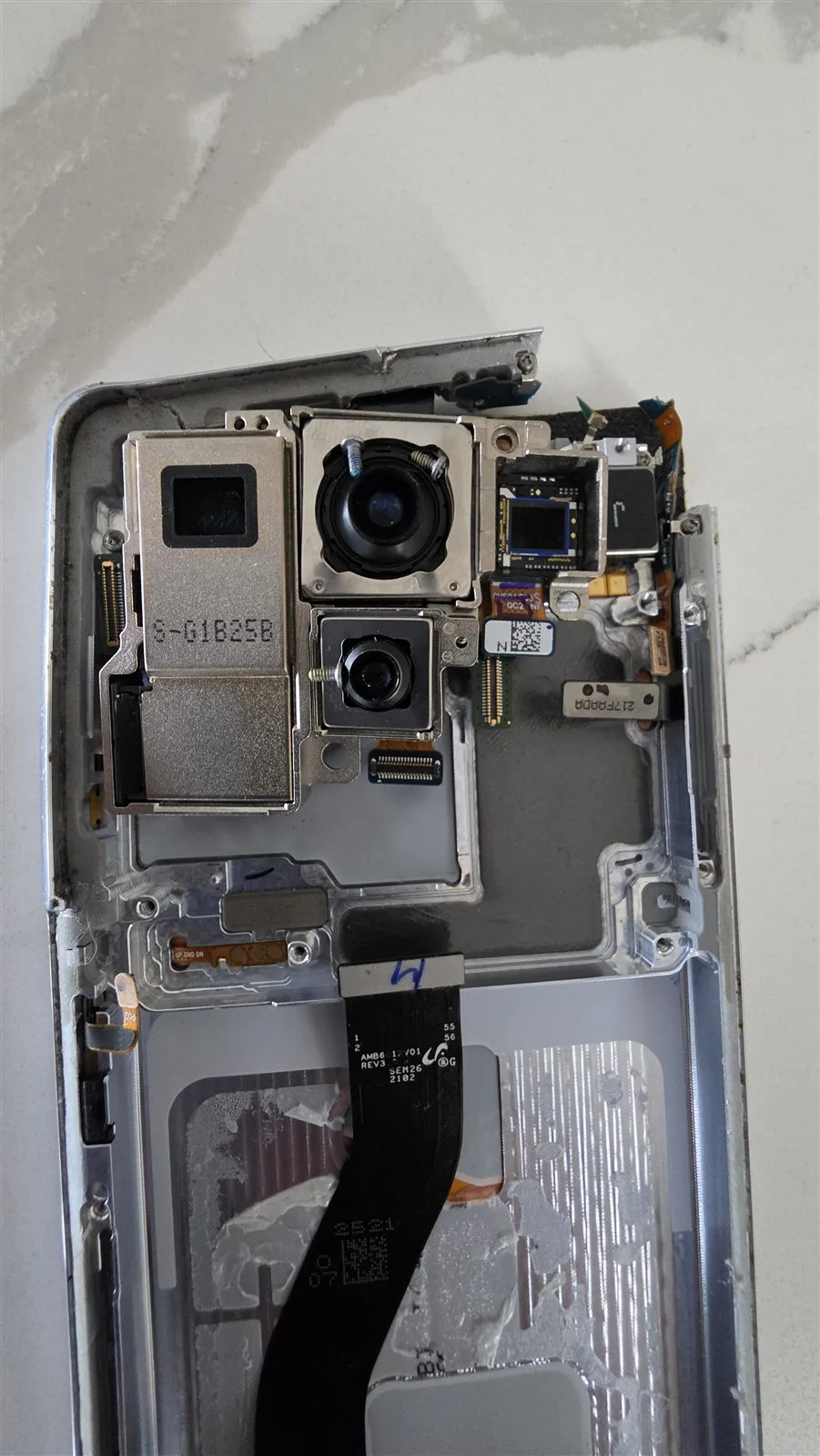
Thrown to the ground, board beyond repair
The problem: the frame was pushed in and the board warped, then a previous repair shop snapped off a corner of the board, cutting its internal connections.
What we did: moved the three chips that hold the data together, the storage chip, the Exynos processor with its memory, and the Knox Vault security chip, onto a healthy donor board of the same model, testing every power rail before and after each step.
The result: a full phone backup, with everything recovered, in about three weeks. The storage chip holds the data, but the processor holds the only key, so they had to move together.
“Wildfire Data Recovery were fantastic to deal with from start to finish. Extremely responsive to any customer requests and we able to perform data recovery and phone repair where Samsung official repairer advised they would not likely be able to preserve the data.”
“Excellent Data Recovery and re set up. Viktor goes above and beyond to explain everything regardless of how long it takes. After disasters through the years gone by with other so-called experts, it was stessfree and a relief to discover Wildfire.”
Offered a replacement?
Before anyone replaces the board or the phone.
Four questions to ask first, whoever is doing the repair.
Is it a repair or a replacement?
A replacement phone, or a new logic board with its own chips, starts empty: the key to your data stays in your old processor.
Do I get the old phone back?
If the data isn’t backed up, keep the old phone. It is the only place the data still is.
Will it be erased or restored?
Apple’s own service steps say a device may come back erased. Ask before you hand it over.
What if the repair doesn’t start it?
Ask them to stop and return it as it is, so a board-level repair is still possible.
05 Start
Start with a free assessment.
Tell us what happened before it died and what you need back. Anything the triage or a path card picked up is already filled in.
Can’t be started? No charge.
Sending this form commits you to nothing, and the assessment is free.
Need confidentiality? We sign an NDA on request, and on every forensic case as standard.
Hot, swollen or hissing?
1300 806 55706 Delivery
Sending a dead phone to the lab.
When an engineer has told you what to do next, request the free Express post-in label, or arrange a drop-off at the lab.
Off, unplugged, checked
Switch it off if you can and leave it unplugged. If it is swollen or was hot, call us first: damaged batteries need special packing.
Box it, with any pieces
Bag up anything that came off in the drop and put it next to the phone. Pad the phone well inside a rigid box, and leave the charger and cable out.
A short note, no passcode
Your name, number and how it died. Leave the passcode off the note, the phone and the box.
Seal and track
Tape the box shut, attach the label we email you and note the tracking number.
A swollen or hot battery
Don’t post it until we have spoken: damaged lithium batteries need special packing, and some can’t go by ordinary post.
Passcodes and account passwords
Keep them out of the parcel and the form. Once the phone starts, you unlock it yourself or we arrange a secure way to pass it on.
Wet or bent?
Leave it unplugged and switched off, and tell us in the enquiry. Wet phones are best sent quickly.
Tick the checks as you prepare the parcel.
07 Answers
Dead phone questions.
Tap a question for the short answer. What works depends on the phone, what happened to it and whether the photos exist anywhere else.
Can you recover data from a phone that won’t turn on?
Usually, yes. The data is on the storage chip and the key is on the processor, so as long as the original board can be made to start once, you unlock it and everything can be copied. That is the work the lab does: battery connections, charging circuits, power chips and shorts, repaired on your own phone. Try the dead phone triage →
Should I take it to Apple or Samsung first?
If everything is backed up, yes. If it isn’t, ask first what the repair involves. A replacement phone or a new logic board starts empty, and Apple’s own service steps say a device may come back erased. If the photos matter and there is no backup, the data has to come off the original board before anyone swaps it. Why a new board can’t read your data →
Is it safe to charge a phone that won’t turn on?
If it is dry, cool, flat and undamaged, yes: Apple says to charge an iPhone for one hour and try again. If it is wet, hot, swollen, bent or smells, don’t: Australia’s consumer watchdog says not to use batteries or products that are overheating or showing signs of failure. Run the safe-to-charge check →
Will a new battery fix it?
Sometimes. A worn battery is a common reason a phone won’t start, and fitting a new one doesn’t touch the storage chip. If the old battery is swollen, don’t charge it, and if a new battery changes nothing, the fault is on the board.
My iPhone shows a computer and a cable. What do I do?
It is in recovery mode. Connect it to a computer; when it offers Update or Restore, choose Update. Apple says Restore reinstalls iOS and erases all your data, and that if the download takes more than 15 minutes the iPhone may leave the recovery screen. Try the simulator →
It died during an update. Is my data gone?
Usually not. An interrupted update often leaves the data where it was. Charge it, and if a computer offers Update or Restore, choose Update. If Update fails, stop there and call us rather than restoring it.
Can you take the memory chip out and read it?
Not usefully. A modern phone encrypts what is on that chip with a key built into its processor, so a chip read on another machine gives scrambled data. That is why the repair is always on the original board.
It got hot, and now it won’t turn on. What now?
Leave it unplugged on a hard surface, away from anything that burns, and don’t charge it again. Heat before a phone dies points to the battery or a short on the board. Call us before you post it: damaged batteries need special packing.
It’s an old phone that has been in a drawer for years.
A battery left flat for a long time can take a while to respond: Google says a fully drained Pixel may show nothing for up to 25 minutes on the charger. Charge it for an hour with a suitable charger. If nothing happens, or the case is bulging, the lab can power the board without the old battery.
Do you need my passcode?
Yes, once it starts, because it has to be unlocked. Keep it out of forms, emails and texts; when the phone is ready we arrange a secure way, or you type it in yourself.
How long does it take?
It depends on what failed. A battery or charging fault is quicker than a power chip or water damage on the board. The quote tells you how long, and urgent jobs can be moved up by arrangement.
What happens to my data after the job?
You get the copied data, and our working copies are wiped 14 days after delivery. The phone is returned free by tracked post, or by courier if you prefer, for a fee.
08 Learn
What really happens when a phone dies.
The four parts that fail, why a new board can’t read your photos, and the one choice on a computer screen that decides whether they survive.
On the board
What fails when a phone dies.
Power has to travel from the battery, through the power chip, to the processor. A break anywhere along that path looks the same from outside: nothing.
Battery
Flat, worn or swollen. The most common reason a phone won’t start.
Charging port
Lint, a damaged socket or a failed charging chip stop the battery refilling.
Power chip
Shares the battery out to everything else. A drop, liquid or a short can take it out.
Processor and storage
Hold the key and your photos. They wait for power, untouched.
Your data is hereThe swap trap
Why a new board can’t read your data.
A replacement phone, or a new logic board, is the quickest way to get a working phone. It is also the quickest way to lose the photos.
Your photos
Stored encrypted on the storage chip.
This phone’s processor
Holds a key unique to this phone, used with your passcode.
The original board
Where the chip and the key sit together.
New board, storage chip alone, or a new phone
The key stays behind, so the data can’t be opened.
Starts emptyOriginal board repaired, or chips moved together
The board is repaired, or its processor and storage are moved together to a donor board. It starts, you unlock it, and everything is copied.
Lab workRecovery mode
Update or Restore: the button that matters.
When an iPhone is stuck, a computer can offer to update or restore it. They sound alike. They are not.
Update
Apple’s first choice: the computer tries to reinstall iOS. If the download takes more than 15 minutes, the iPhone may leave the recovery screen and you repeat the steps.
Restore
In Apple’s words, it reinstalls iOS and erases all your data. Only for a phone whose photos are already backed up.
On Android
The phone’s own recovery menu has the same trap: “Wipe data/factory reset”, which Google says erases all your data.
For iPhone boot loops in more detail, see iPhone boot loop data recovery. For the buttons that put each iPhone into recovery mode or DFU mode, see the recovery mode and DFU mode guide.
Sources
Where the statements on this page come from.
Where these facts come from (14 sources)
- Apple: restart an unresponsive iPhone (charge for one hour; force restart)
- Apple iPhone User Guide: force restart iPhone
- Apple: if you can’t update or restore your iPhone (Restore erases all your data)
- Apple: prepare your iPhone or iPad for a service appointment
- Apple: if you see a liquid-detection alert (don’t use rice or heat)
- Apple Platform Security: passcodes and passwords
- Samsung Australia: what to do if your Galaxy won’t turn on
- Google: fix a Pixel phone that won’t charge or turn on
- Google: reset your Android device to factory settings
- Android Open Source Project: file-based encryption
- ACCC: use and store lithium-ion batteries safely (5 October 2023)
- Product Safety Australia: lithium-ion batteries guide
- Wildfire: iPhone won’t turn on (iPhone detail)
- Wildfire: locked phone data recovery (forensic unlocking for supported models)
Sources checked 8 November 2026. Each record in the library below links to the page that documents it.
09 Library
Faults, steps and sources.
Search a fault, a maker’s step or a term. Each record links to the Apple, Samsung, Google or other page that documents it, and a fault record can carry the situation into your enquiry.
Why phones dieFlat or worn batteryEvery phone
- How you can tell
- It died when the battery ran out, and nothing happens on the charger at first
- What to do
- Charge for an hour with the maker’s charger in a wall socket, then force restart
- Your data
- Untouched
Source checked 8 November 2026 · Bookmark this record
Why phones diePower chip or short on the boardEvery phone
- How you can tell
- Nothing at all, even on a known-good charger, often after a drop, liquid or heat
- What usually failed
- The power chip, a battery connector or a short somewhere on the board
- Your data
- Still on the storage chip, waiting for the board to start
Source checked 8 November 2026 · Bookmark this record
Why phones dieStuck on the logo, or boot loopEvery phone
- How you can tell
- The logo appears, then the phone restarts, again and again
- What usually failed
- Software, a failing storage chip or a board fault that resets it
- Avoid
- Restore on a computer and factory reset from the recovery menu: both erase everything
Source checked 8 November 2026 · Bookmark this record
Why phones dieSwollen or hot batteryEvery phone
- How you can tell
- The screen or back is lifting, the phone sits unevenly, or it got hot
- What to do
- Unplug it, leave it on a hard surface away from anything that burns, and don’t charge it
- If it smokes
- Call 000
Source checked 8 November 2026 · Bookmark this record
Why phones dieWon’t chargeEvery phone
- How you can tell
- No charging sign with any cable or plug
- Try first
- The maker’s cable and a wall plug, and a torch to check the port for lint
- Avoid
- Pins or anything metal in the port, and damaged cables
Source checked 8 November 2026 · Bookmark this record
Maker stepForce restart an iPhoneiPhone
- Face ID, iPhone 8 and SE (2nd gen or later)
- Press and release volume up, press and release volume down, then hold the side button until the Apple logo
- iPhone 7
- Hold volume down and the side button until the Apple logo
- iPhone 6s or earlier
- Hold the Home button and the side or top button until the Apple logo
- If it still won’t turn on
- Charge it for one hour and try again
Source checked 8 November 2026 · Bookmark this record
Maker stepForce restart a GalaxySamsung Galaxy
- The buttons
- Power (Side) and Volume Down together
- How long
- At least 7 seconds
- Charger
- Samsung-approved chargers and cables only
Source checked 8 November 2026 · Bookmark this record
Maker stepRestart a Pixel that won’t turn onGoogle Pixel
- Charge first
- At least 10 minutes; a fully drained Pixel may show nothing for up to 25 minutes
- Then
- Hold the Power button for about 35 seconds
- Rings, but blank
- That is a screen fault
Source checked 8 November 2026 · Bookmark this record
Maker stepRecovery mode: Update or RestoreiPhone and iPad
- Restore
- Reinstalls iOS and erases all your data
- Apple’s advice
- If you haven’t tried updating yet, try updating first
- The 15-minute limit
- If the download takes longer, the iPhone may leave the recovery screen
Source checked 8 November 2026 · Bookmark this record
Maker stepFactory reset from the recovery menuAndroid
- What it does
- Erases all your data from the phone
- When to use it
- Only once the data is safe somewhere else
Source checked 8 November 2026 · Bookmark this record
Maker stepBefore a repair or replacementEvery phone
- Apple’s advice
- Back up first; Apple warns a serviced device may come back erased
- What to ask
- Is it a repair or a replacement, and will it be reset?
Source checked 8 November 2026 · Bookmark this record
GlossaryPower chip (PMIC)Glossary
The chip that turns the battery’s power into the voltages the rest of the phone needs. When it fails, nothing starts, even with a full battery.
Source checked 8 November 2026 · Bookmark this record
GlossaryBattery connectorGlossary
The small plug that joins the battery to the board. A drop can loosen or crack it, so the phone looks dead with a healthy battery.
Source checked 8 November 2026 · Bookmark this record
GlossaryShort circuitGlossary
A path for current where there shouldn’t be one, often from liquid, corrosion or a crack. The phone protects itself by refusing to start, and it can get warm on the charger.
Source checked 8 November 2026 · Bookmark this record
GlossaryRecovery modeGlossary
A mode where the phone waits for a computer to reinstall its software. On an iPhone the computer offers Update or Restore; only Restore is described by Apple as erasing all your data.
Source checked 8 November 2026 · Bookmark this record
GlossaryLogic boardGlossary
The phone’s main circuit board, with the processor that holds the key unique to that phone and the storage chip with your data. A new board with its own chips can’t open them; when a board is beyond repair, its processor and storage have to move together.
Source checked 8 November 2026 · Bookmark this record
GlossaryChip-offGlossary
Removing the storage chip to read it on another machine. On a modern encrypted phone this gives scrambled data, because the key stays with the original processor.
Source checked 8 November 2026 · Bookmark this record
No records match that search. Try a shorter phrase or a single word, or ask us directly.
One call or one form
Tell us how it died.
We’ll tell you straight what it will take.
Looking costs nothing. If it can’t be started, that costs nothing either.