⚠ Do now
iPhone Unavailable or forgot the passcode? Locked phone data recovery, Brisbane.
Security Lockout, a forgotten Android PIN, or the phone of someone who has died?
Locked phone data recovery starts with one question: does anyone know the passcode? If you do, but the phone is smashed, dead or wet, the lab repairs it far enough for you to unlock it, then copies the data. If nobody does, the data stays encrypted behind the passcode, but for some models and software versions our licensed forensic tools can still unlock the phone or copy its data, for the owner or someone with lawful authority. We check your exact model free, help you find the copies that already exist, and guide families through the steps after a death.
- Free assessment, nothing to pay if there is no route
- Your exact model checked free first
- Unlocks only for the owner or lawful authority
- Our copies wiped 14 days after delivery
- 01Lock screen, where the passcode is typed
- 02Key chip, with a key unique to this phone
- 03Encrypted storage, your photos and messages
- 04Logic board, which keeps them together
Drag the slider to take the phone apart and put it back together.
Inside the lock
Part 1 of 4
The passcode opens the key.
When you type the passcode, the phone combines it with a secret key built into its processor. Only that combination unlocks the key that decrypts your photos, messages and app data.

Who reviews your locked phone case
Viktor Burcevski
Executive Data Engineer / Executive Forensic Consultant
Every locked phone and estate case is reviewed by Viktor before anything is quoted. He checks the ownership or legal authority, decides whether the phone needs a repair before its owner can unlock it, and tells you plainly when there is no route. When a phone is needed as evidence, he signs the forensic report.
- Ownership checks
- Forensic unlocking
- Estate cases
- Forensic reports
What Viktor works on
Phones from deceased estates, handled under the executor’s or administrator’s authority; damaged phones repaired so their owners can unlock them; and phones needed as evidence, handled with a documented chain of custody for a lawyer, an insurer or a court.
72 hrsOld passcode still works after a change
5Wrong tries before iPhone Unavailable
10Wrong tries before an optional erase
FreeModel and lock check
4.8★Google rating, 96 reviews
The 20-second answer
Locked phone? Here is what is possible.
If someone knows the passcode, a broken, dead or wet phone can often be repaired far enough to unlock it and copy the data. If nobody knows it, some models and software versions can still be unlocked with our licensed forensic tools, for the owner or someone with lawful authority. We check yours free.
What should I do right now?
- Stop guessing. Write down the passcodes already tried.
- Changed it in the last 72 hours? Use the previous passcode option.
- Check for copies at iCloud.com, Google Photos and Drive, Samsung Cloud and any computer backup.
- Ask us before any reset. Some models can be unlocked without the passcode, and a reset erases everything.
Know the passcode, but the phone is broken?
That is lab work. The screen, power or board is repaired on the original phone, you unlock it, and the data is copied.
Can it be recovered without the passcode?
Sometimes. Apple says it can’t remove a passcode without erasing the device, but for some models and software versions our licensed forensic tools can unlock the phone or copy its data. Otherwise, the previous passcode and copies saved elsewhere are the routes.
What does it cost?
The assessment is free, and if there is no route you pay nothing. Repair work is quoted in writing before it starts.
Lockout meter · iPhone and iPad
How many wrong passcodes so far?
Tap the number. The meter shows what the iPhone does at that point, and how close it is to locking for good.
The first wait comes at the 5th wrong try.
Waits then grow from 1 minute to 8 hours. At 10 or more the iPhone must be connected to a computer, and if Erase Data is turned on, the 10th wrong try erases it.
Waits from Apple’s security guide; in our lab the first one shows at the 5th wrong try. A restart doesn’t reset the wait. Every wait, in order →
72-hour clock
Changed the passcode recently?
For 72 hours after a change, the old passcode still unlocks an iPhone on iOS 17 or later, and a Galaxy on One UI 6.1 or later.
Enter the date and time to see how long is left.
- After five wrong tries, tap Forgot Passcode? on the Unavailable screen.
- Tap Enter Previous Passcode and enter the old one.
- Set a new passcode straight away.
How the lock works
Why a passcode is hard to get past
The passcode isn’t just a door in front of the data. It is half of the key that decrypts it.
Your passcode
Typed on the lock screen. Only you know it.
A key built into the chip
Unique to that phone, so the unlocking can only happen on it.
Your photos and messages
Readable while the phone is unlocked.
Nobody knows the passcode
The data stays encrypted. For some models and software versions, forensic tools can still get in; for others there is no route.
Depends on the modelPasscode known, phone broken
The lab repairs the phone so you can enter the passcode, then the data is copied.
Lab work01 Symptoms · start here
What is happening with your locked phone?
Start with one question: does anyone know the passcode? Then choose the situation closest to yours. Your choice opens the next steps and is added to the enquiry form lower down.
Route checker
Three taps to your route
Answer three questions and get your next steps, in order.
Locked to a carrier? That is a network lock, and the carrier removes it. Lost your Apple Account or Google account password rather than the screen passcode? Start with their account recovery.
Lock screen simulator · iPhone
What does each button really do?
Tap the screen as you would on the phone. Nothing here touches your iPhone.
iPhone Unavailable
Try again in 15 minutes
Security Lockout
Choose an option
Enter Previous Passcode
Sign out of Apple Account
Hello
Set up as a new iPhone, or restore a backup
On the screen now
iPhone Unavailable
Shown after five wrong passcodes. Tap Forgot Passcode? or Emergency to see what each does.
- Enter Previous Passcode unlocks with the old passcode, within 72 hours of a change.
- Start iPhone Reset signs out with the Apple Account password, then Erase iPhone deletes everything.
- Emergency makes emergency calls only.
Simplified, from Apple’s support pages. Wording varies by iOS version: on iOS 15.2 and 16, Erase iPhone appears where Forgot Passcode? is shown here. Other lock screens: Galaxy Forgot PIN · Google Account check · Activation Lock
Or choose the closest situation below.
I don’t know which phone I have
Look at the back of the phone. You don’t need to unlock it, and please don’t try passcodes to find out.
The make is enough. The exact model can be confirmed at assessment.
Choose a situation to see your next step.
Asked first
The questions people ask about a locked phone
Can you recover data from a locked iPhone or Android phone?
If the passcode is known, often yes, even when the phone is broken, because the lab can repair it far enough for its owner to unlock it. Without the passcode it depends on the model: for some models and software versions our licensed forensic tools can unlock the phone or copy its data; for others, copies in the cloud or on a computer are the route. Every route, in order →
Forgot iPhone passcode? What happens to my photos?
They stay on the iPhone, encrypted, until it is erased. Apple’s fix for a forgotten passcode erases the iPhone, so photos that weren’t in iCloud Photos or a backup go with it. Before you reset, check iCloud.com and your computer, and ask us whether your model can be unlocked.
Can Apple unlock my iPhone without erasing it?
No. Apple says it can’t remove the passcode lock without erasing the device, even for a family member with legal documents. The one exception is Passcode Reset: for 72 hours after a change, the previous passcode still works on iOS 17 and later. Every option compared →
What does iPhone Unavailable, Security Lockout or iPhone disabled mean?
Too many wrong passcodes. The Unavailable screen appears after five wrong tries, and each further try adds a longer wait, up to 8 hours. From iOS 15.2 the screen also offers a reset, which erases the iPhone. Apple’s help pages also call this a disabled iPhone. How long it lasts →
How long does an iPhone stay Unavailable?
Each wrong passcode adds a longer wait: 1 minute, then 5 minutes, 15 minutes, 1 hour, 3 hours and 8 hours. After 10 wrong tries the iPhone stays locked until it’s connected to a Mac or PC, and Apple’s reset then erases it. Restarting doesn’t help: the wait is still enforced, and the timer starts over. Every wait, in order →
Can an iPhone be unlocked if it says Unavailable?
Apple can’t unlock it without erasing it, apart from the previous passcode within 72 hours of a change on iOS 17 and later. For some models and iOS versions, our licensed forensic tools can unlock it or copy its data, for the owner or someone with lawful authority. We check your exact model free before anything is erased. Which ways in keep the data → Every method, rated by data loss →
Can I get photos off a locked iPhone without erasing it?
Yes, if it can be unlocked: with the passcode, the previous passcode within 72 hours of a change, or our forensic tools if your model and iOS version are supported. Otherwise, look for the copies: iCloud Photos at iCloud.com, an iCloud or computer backup, and other Apple devices signed in to the same Apple Account. Check what an erase would lose →
Forgot Samsung password or PIN? Can I get in without losing data?
On your own, only with the previous PIN, password or pattern, within 72 hours of changing it, on One UI 6.1 or later; Samsung says SmartThings Find can no longer unlock a phone remotely. For some Galaxy models our forensic tools can still get in without erasing it, so ask us before any factory reset. The full Samsung guide →
Before you try anything else
Safe to do. Not safe. Call first.
Every step here keeps the passcode, the previous passcode and the copies within reach.
Safe to do
- Write down every passcode you have already tried, so none is repeated.
- From another device, check iCloud.com, Google Photos and Drive, Samsung Cloud and any computer backups.
- Gather proof of ownership: the receipt, the carrier account, or the Apple or Google account the phone uses.
Do not do this
- Keep guessing once the wait starts to grow.
- Erase, reset or remove the phone from its Apple or Google account before every copy has been checked.
- Run unlock software from the internet on the phone.
Stop and call first
- Its owner has died and it is still switched on.
- It may be needed as evidence.
- It has been wet, or the battery is swollen or hot.
02 Costs · Quoted after assessment
What locked phone data recovery costs.
No fixed prices: the cost depends on the repair or the forensic unlock your phone needs.
How much does it cost to get data off a locked phone?
It depends on what is wrong with the phone. A phone that only needs its passcode entered costs nothing to assess, and a phone that needs a screen or board repair first is quoted in writing after the free assessment. When nobody knows the passcode, we first check whether your model can be unlocked, and tell you at the start if it can’t.
Whether anyone knows the passcode
Without it, a forensic unlock depends on your model and is quoted after the free check.
What is broken
A screen or touch repair is less work than a dead or corroded board, or a swollen battery.
How much needs copying
A full phone takes longer to copy and check than one folder of photos.
Estate or evidence work
Authority checks add steps; chain of custody and a report are scoped and priced separately.
Free assessment. Written quote. Your decision.
If there is no route, we say so and you pay nothing. You approve the written quote before any chargeable work. Request my free assessment →
Your choice of speed
How fast do you need it back?
Diagnosis is free on every phone, whichever speed you choose. The priority fee pays for the faster service; the recovery fee follows what the phone needs.
Free diagnosis
Standard queue. The phone is diagnosed in about 3 to 5 business days, then you get a fixed quote in writing, with no obligation.
$650 + GST upfront
Front of the queue with an engineer assigned the same day, usually 24 to 48 hours. For work deadlines, legal matters and data that can’t wait.
$1,400 upfront
We start immediately and keep going through nights, weekends and public holidays until it is done.
The recovery fee follows complexity.
Most phone recoveries cost $220 to $1,200 + GST. Level 5 jobs, such as moving the chips to a donor board after a crush or a heavy impact, are quoted individually. Every quote is fixed in writing after the free diagnosis, and if nothing can be recovered there is no recovery fee.
Worth it?
Is it worth paying for?
It depends on one thing more than any other: whether the passcode is known.
When you know the passcode
Worth sending for the free assessment: a broken phone can often be repaired far enough to copy everything.
When nobody knows it
Ask for the free model check first. If your model can’t be unlocked, check the cloud and the computers at home; we can help you look.
When it was a family member’s phone
Start with Apple’s or Google’s own processes and the family computers. Call us before anything is erased.
03 Process · Inside the lab
How we handle a locked phone, step by step.
Every step is explained before it happens, and you approve anything chargeable in writing first.
- 01Whose phone it isWe check ownership, or the executor’s, administrator’s or court’s authority, before anything else.
- 02Assessed as it isThe phone is inspected as it is, and its model, chip and software checked against our forensic tools.
- 03Your options in writingWhat can be done and what it costs, or plainly, that there is no route.
- 04Repaired or unlockedRepairs on the phone’s original board, or a forensic unlock where your model is supported.
- 05Copied and checkedWith your passcode or our forensic tools, the data is copied and checked against what matters most to you.
- 06Returned, copies wipedYour data comes back to you, and our working copies are wiped 14 days after delivery.
04 Laboratory
Who works on your phone.
Your phone stays with three named engineers in one Brisbane laboratory, from the first call to the day it goes back. The work is done in-house.

David Williams
Co-founder · Mobile & Encryption
David co-founded Wildfire in 2018 and reviews every locked phone case: what the lock protects, what a repair can make possible, and what can’t be done.
- Phones & tablets
- Encryption
- Estate cases
What David works on
Phones and tablets that need a repair before their owners can unlock them, the honest conversation when a passcode is lost for good, and the computers and backups that so often hold a copy.
Viktor Burcevski
Executive Data Engineer / Executive Forensic Consultant
Checks the authority on estate and legal cases, leads the laboratory, and signs the forensic report when a phone is needed as evidence.
- Authority checks
- Forensic unlocking
- Forensic reports
What Viktor works on
Estate cases handled under a grant of probate or letters of administration, and evidence kept under a chain of custody that is recorded from the day it arrives.

Martin Daniels
Electrical Engineer
Repairs the boards of dead, wet and broken phones so they power on long enough for their owners to unlock them.
- Board repair
- Power faults
- Liquid damage
- Micro-soldering
What Martin works on
Corroded and shorted boards, failed power circuits and damaged connectors, repaired at component level so the original board, and the keys on it, are kept.
From our bench
A locked iPhone many labs would turn away.
The owner had forgotten the passcode. The free model check said yes, and the photos and messages came back.
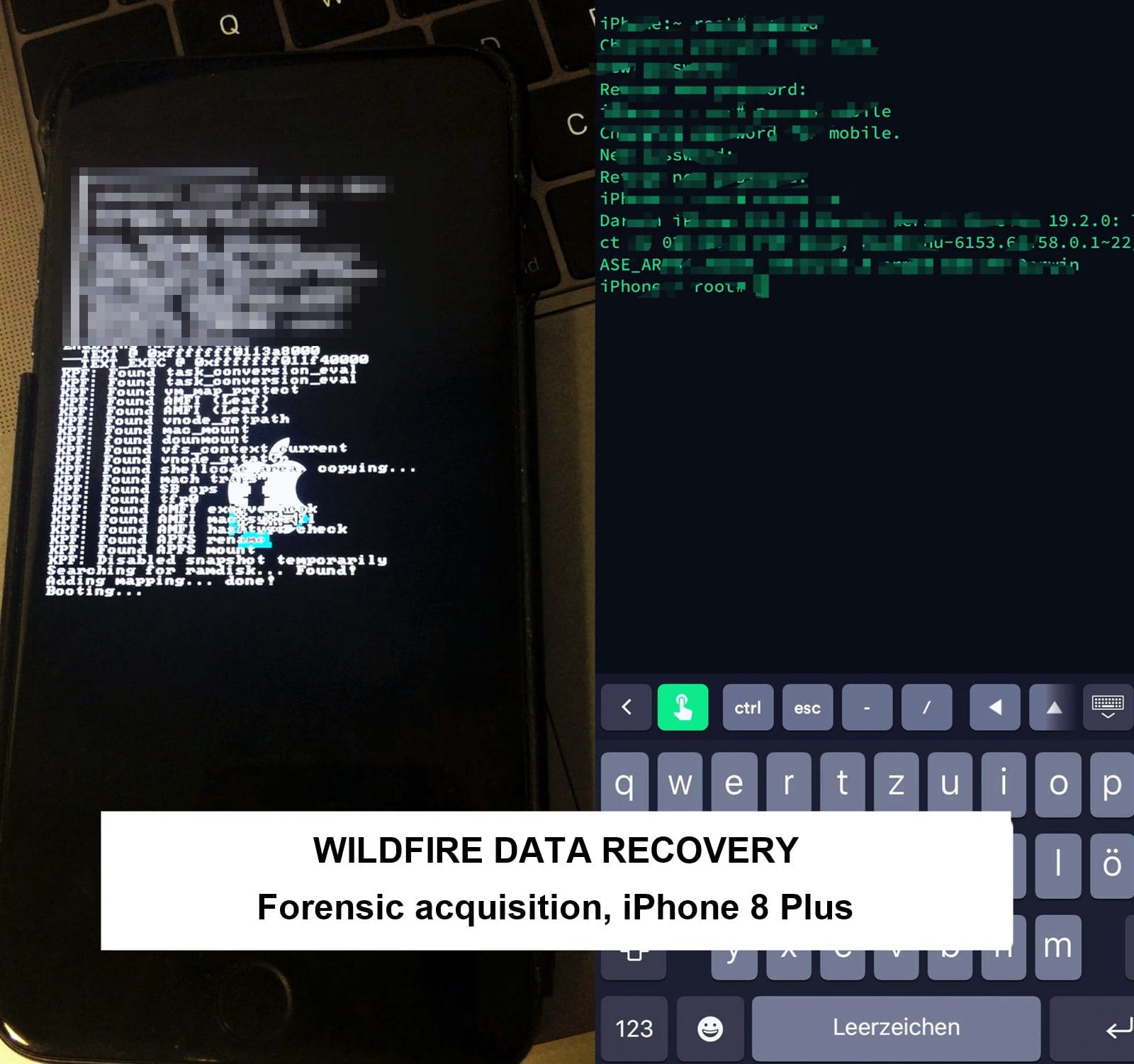
iPhone 8 Plus · July 2026
Forgotten passcode, photos and messages recovered
The problem: the owner forgot the passcode and had photos and messages they needed back.
What we did: confirmed the owner’s identity and ownership first. The iPhone 8 Plus is one of the models our forensic tools support, so we made a forensic acquisition of the phone, then used e-discovery processing to find, sort and export the photos and messages.
The result: photos and messages recovered and returned to the owner, in about four weeks including the e-discovery work.
Why the model mattered: older iPhones up to the iPhone 8 and X have a flaw in their boot chip that Apple can’t fix with a software update, and forensic tools can use it. Newer models don’t have it, which is why we check your exact model free before you pay anything.
“Wildfire Data Recovery were fantastic to deal with from start to finish. Extremely responsive to any customer requests and we able to perform data recovery and phone repair where Samsung official repairer advised they would not likely be able to preserve the data.”
“Excellent Data Recovery and re set up. Viktor goes above and beyond to explain everything regardless of how long it takes. After disasters through the years gone by with other so-called experts, it was stessfree and a relief to discover Wildfire.”
Choosing a lab for a locked phone
How to choose a lab for a locked phone.
Four questions that separate a careful lab from a risky one.
Read the four questions
Do they check your model first?
A careful lab tells you whether your exact model and software can be unlocked before you pay, and says so plainly when it can’t.
Do they check that it’s yours?
A careful lab asks for proof of ownership or legal authority before it touches a locked phone.
What do you pay if there is no route?
Ask before you send it. At Wildfire the answer is nothing.
How do they want the passcode?
Never by email or a web form. The lab should give you a secure way, and only when it is needed.
Before you send it
Who we can help
Recovery from a locked phone is only for its owner, or for someone with lawful authority to act for the owner.
The owner
Proof can be the receipt, the carrier account, or the Apple or Google account the phone uses.
An executor or administrator
The death certificate, with the grant of probate or letters of administration, or the will naming you as executor where no grant is needed.
A legal or police matter
A solicitor’s letter, court order or subpoena. This is forensic work. Mobile phone forensics →
We can’t help with a phone you found, bought locked or have no authority for. Getting into someone else’s phone without their consent or lawful authority can be a crime.
05 Start
Start with a free assessment.
Tell us what happened and what you need back. Anything you chose higher up is already filled in below, ready for you to check.
No route, no charge.
The assessment costs nothing, and sending this enquiry doesn’t commit you to anything.
Need confidentiality? We sign an NDA on request, and on every forensic case as standard.
A family member’s phone that is still on?
1300 806 55706 Delivery
Sending a locked phone to the lab.
Wait until we have confirmed the next step and checked ownership or authority. Then request your free Express post-in label.
Leave it as it is
Don’t reset it or sign it out of any account. A wet, damaged or hot phone goes in switched off.
Pack it to travel
Wrap it in a soft cloth and pack it in a rigid box, cushioned on every side.
Add copies of your documents
Proof of ownership or authority, as copies, never originals. Never write the passcode on the phone or the paperwork.
Seal, label and track
Close the box, stick on the label we send you and keep the tracking number.
A family member’s phone that is still on
Call 1300 806 557 before it is switched off or the battery runs flat, and leave it as it is until we have spoken.
Passcodes and account passwords
Keep them out of the box and out of the enquiry. We tell you a secure way to give them when they are needed.
Needed as evidence?
Tell us before you send anything. Forensic handling is scoped and quoted separately. Mobile phone forensics →
Tick the checks as you prepare the parcel.
07 Answers
Locked phone questions.
Tap a question for the short answer. What is possible depends on the phone, its software and whether anyone knows the passcode.
Can you unlock my phone?
For some models and software versions, yes. Our licensed forensic tools (Oxygen Forensic Detective, Cellebrite UFED and Magnet Verakey) can unlock a phone or copy its data without the passcode. Support depends on the exact model, chip and software version, so we check yours free first, and we only do it for the owner or someone with lawful authority. Who we can help →
Will my Apple Account password unlock the screen?
No. The Apple Account password and the screen passcode are different things. With the Apple Account password you can reset a locked iPhone from its lock screen, but that reset erases the iPhone.
Are unlock apps safe to try?
Treat them with suspicion. Consumer unlock software is not the same as the licensed forensic tools labs use, and running it can change or reset the phone before anyone else sees it. Ask us about your model first, and never give such a tool your Apple or Google password.
Should I try recovery software first?
Not on a locked phone. Recovery software can only reach the data once the phone is unlocked. If you can unlock it, the phone recovery page explains when software is worth trying. Mobile phone data recovery →
How long does it take?
You get the timing in the written quote after the free assessment. A screen or touch repair is usually quicker than board work on a dead or wet phone. Estate cases also wait on the paperwork.
What do I need if the owner has died?
The death certificate, and the grant of probate or letters of administration, or the will naming you as executor where no grant is needed. For the person’s Apple account, Apple accepts other documents instead of a court order in Australia: ask Apple what it needs for your case. The steps for a family, in order →
Do you need my passcode, and how do I give it safely?
If the phone needs a repair first, the passcode is needed later, to unlock it and copy the data. Never send it in an enquiry, an email or with the phone. The laboratory tells you a secure way to give it when it is needed. If nobody knows it, tell us, and we check whether your model can be unlocked without it.
Can you remove Activation Lock?
No. Activation Lock comes off with the Apple Account and password that were on the iPhone. For a family member who has died, Apple may help remove it, and the iPhone is then restored to factory settings.
My phone is locked to a carrier. Can you help?
That is a network lock, not a passcode, and it doesn’t stop you reaching your data. The carrier you bought the phone through removes it.
What happens to my data after the job?
It is returned to you, and our working copies are wiped 14 days after delivery.
Will you work on a phone I found or bought second-hand?
No. We only work for the owner, or for someone with legal authority such as an executor or a court. Return a found phone to its owner, the police or the carrier, and take a locked second-hand phone back to the seller.
08 Learn
Before anything is erased.
What recovery mode and DFU mode really do, where copies of your data may already be, the steps for a family after a death, and two settings that stop your own family being locked out.
Know this before anyone restores it
Recovery mode and DFU mode, explained.
Repair shops, unlock tools and Apple’s own passcode fix all go through one of these two modes. They are the right tool for a phone that will not start, and the wrong one for a forgotten passcode, because the Restore step they lead to erases the data.
Recovery mode and DFU mode
Two modes a lab or a computer can use. Neither one unlocks the phone.
Recovery mode and DFU mode are ways of starting an iPhone without its normal software, so a computer can reinstall iOS. Both are useful. Both lead to a Restore button that erases every photo and message on the phone. Know what each does before anyone presses it.
Recovery mode
The “Connect to computer” screen
The iPhone starts a small helper system and shows a cable and a laptop. A Mac or PC then offers Update or Restore.
- Update reinstalls iOS and tries to keep your data. If a computer offers it, it is the one to try first.
- Restore reinstalls iOS and erases all your data. It is the only choice when the passcode is forgotten.
- Why it matters: if the phone just will not start, recovery mode with Update is a fair first try. It cannot get past a forgotten passcode.
DFU mode
A black screen the computer can still see
Device Firmware Update mode goes one level deeper. The screen stays black, the normal software is not loaded, and the data stays encrypted. Your computer sees the phone and offers only Restore.
- Restore from DFU erases everything and reinstalls iOS and the firmware from scratch.
- Why it matters: DFU is the last resort for a phone that will not even reach recovery mode. It is also the mode some unlock tools use, which is why they end with an empty phone.
- Entering it erases nothing. Only Restore does. If you entered it by mistake, a force restart takes the phone out again.
Which iPhone is it?
iPhone 8 and later includes every Face ID model and the iPhone SE (2nd and 3rd generation). iPhone 6s and earlier includes the SE (1st generation). Plug the iPhone into a Mac or PC first.
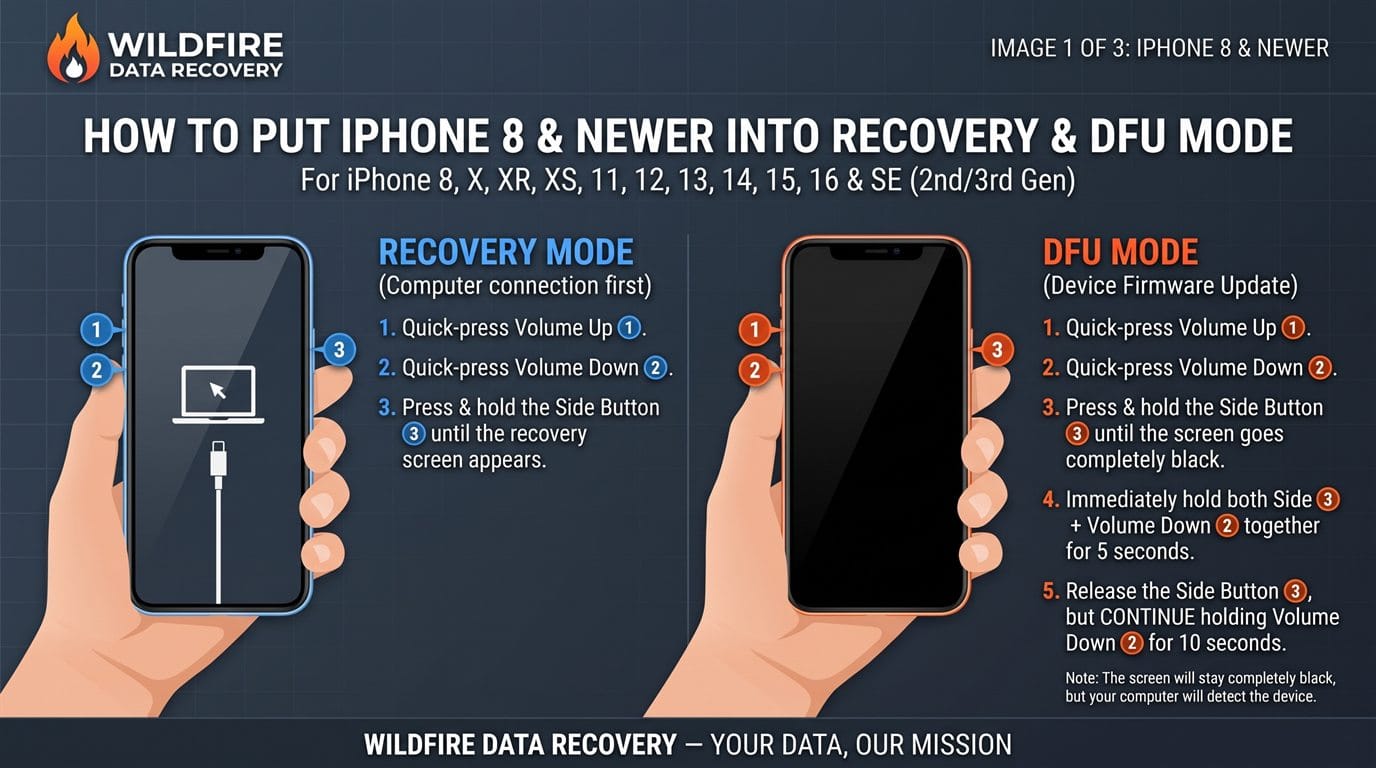
Recovery mode
- Press and quickly release Volume Up.
- Press and quickly release Volume Down.
- Press and hold the Side button until the “Connect to computer” screen appears.
DFU mode
- Press and quickly release Volume Up, then Volume Down.
- Press and hold the Side button until the screen goes black.
- Keep holding Side and add Volume Down for about 5 seconds.
- Release Side, keep holding Volume Down until the computer finds the iPhone, about 5 to 10 seconds. The screen stays black; the computer reports an iPhone in recovery mode.
To get out of either mode: press and quickly release Volume Up, then Volume Down, then hold the Side button until the Apple logo appears.
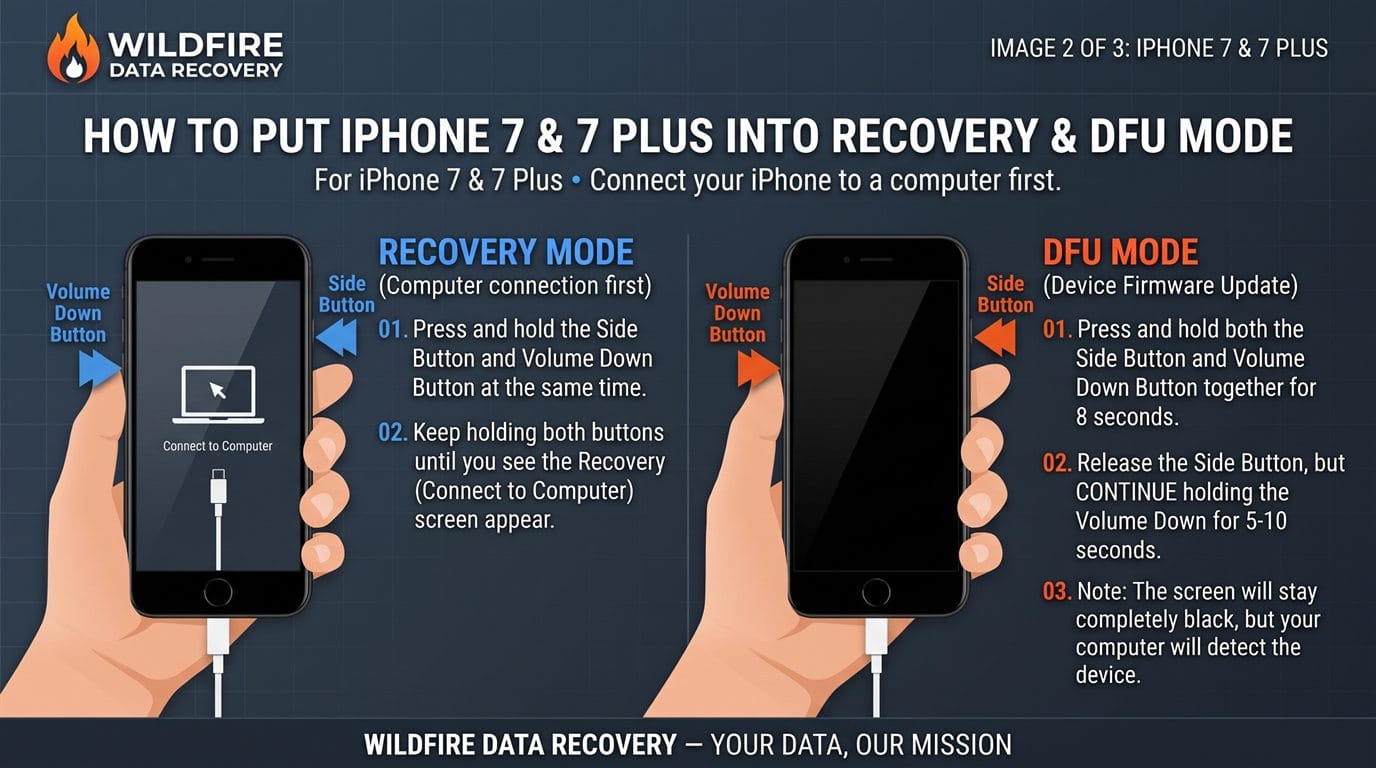
Recovery mode
- Press and hold the Side button and Volume Down at the same time.
- Keep holding both until the “Connect to computer” screen appears.
DFU mode
- Press and hold the Side button and Volume Down together for about 8 seconds.
- Release Side, keep holding Volume Down until the computer finds the iPhone, about 5 to 10 seconds. The screen stays black; the computer reports an iPhone in recovery mode.
To get out of either mode: hold the Side button and Volume Down together until the Apple logo appears.
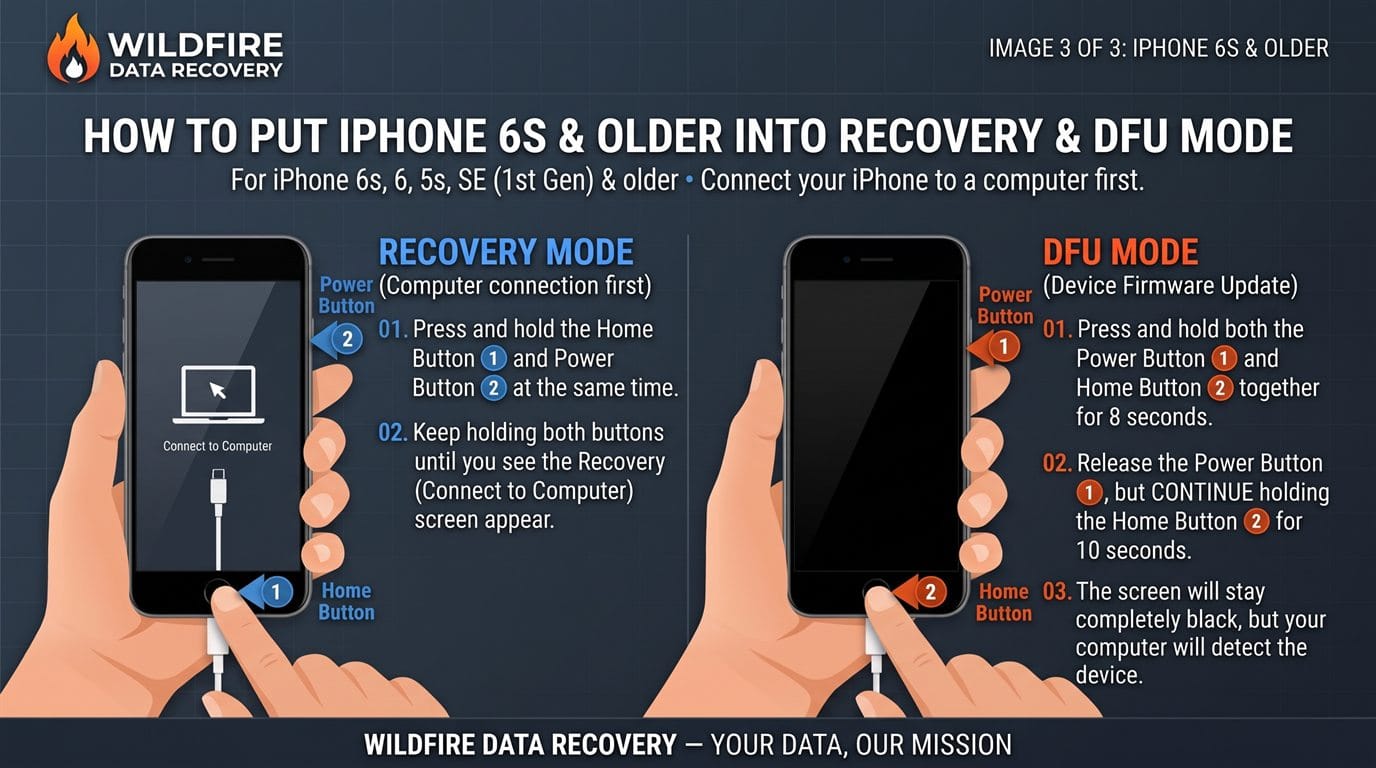
Recovery mode
- Press and hold the Home button and the Power button (top or side) at the same time.
- Keep holding both until the “Connect to computer” screen appears.
DFU mode
- Press and hold the Power button and the Home button together for about 8 seconds.
- Release Power, keep holding Home until the computer finds the iPhone, about 5 to 10 seconds. The screen stays black; the computer reports an iPhone in recovery mode.
To get out of either mode: hold the Home button and the Power button together until the Apple logo appears.
Before you press Restore on a locked phone, stop. If the passcode is forgotten and there is no backup, Restore is the step that makes the data unrecoverable. For some models our lab can copy the data off the locked phone first. The model check is free: ask before anyone restores it.
Button steps from Apple’s recovery mode and restart guides; DFU timings from iFixit’s DFU guide, as Apple publishes none. If the phone is damaged, don’t force it: a cracked screen or a sticky button can turn a mode change into a reset.
Check these first
Where copies of your data may already be.
Most phones copy photos and messages somewhere else without being asked. Check all of these, from another device, before a locked phone is reset.
Copies finder
Tick off every place a copy might be
Check each one from another phone or a computer, then mark what you found.
- iCloud PhotosSign in at iCloud.com and open Photos.
- iCloud BackupOn another Apple device signed in to the same Apple Account, look for the iPhone’s backup in iCloud.
- A Mac or PCFinder or the Apple Devices app for iPhone backups; Samsung Smart Switch for a Galaxy. An encrypted backup also needs its own password.
- Google PhotosSign in at photos.google.com. Many iPhone owners use it too.
- Google One backupCheck Google One for a backup of the phone.
- Google DriveFiles and documents at drive.google.com.
- Samsung CloudOn a Galaxy, if Samsung Cloud backup was turned on.
- WhatsApp and other chat appsThey keep their own backups in iCloud or Google Drive.
- Other devices and accountsAn iPad, Mac or tablet on the same account, email attachments and social media uploads.
Nothing checked yet.
Mark each place as you check it. Don’t reset the phone until you have.
If the computer that holds the backups has failed, it can be recovered: Mac data recovery or laptop and PC data recovery.
When the owner has died
The steps for a family, in order.
Losing someone is hard enough without a locked phone. Keep the phone as it is, look for the passcode, then work through Apple’s or Google’s own processes and the computers at home before you bring the phone to us.
Read the six steps
- 01Keep the phone as it isDon’t guess passcodes or erase it. If it is still on, leave it on and call us.
- 02Look for the passcodeIn papers, a password manager or with family members who might know it.
- 03Check for a Legacy ContactIf they made you their Apple Legacy Contact, Apple gives you account data such as photos, messages, notes and backups, with the access key and a death certificate. It doesn’t unlock the phone.
- 04Ask Apple or GoogleApple takes requests from the deceased’s legal representative or heir and, in Australia, accepts other documents instead of a court order. Google reviews each request and never gives out passwords.
- 05Check the computers at homeBackups and synced photos are often on the family Mac or PC. A computer that has failed can be recovered.
- 06Bring us the phone and your authorityWith the death certificate and the grant, or the will where no grant is needed, we tell you what can be recovered and from where.
For your own family
Set it up now so your family isn’t locked out.
A few minutes now saves the people you leave behind the hardest part: an Apple Legacy Contact, Google’s Inactive Account Manager, and a safe place for the passcode itself.
Read more
Apple Legacy Contact
Add one in your Apple Account settings, on iOS 15.2 or later. Each contact gets an access key: keep a copy with your will.
Google Inactive Account Manager
Choose who can be given your Google data, and whether the account is deleted, if it stops being used.
The passcode itself
A password manager with emergency access, or a sealed note with your will, lets someone you trust unlock the phone itself.
Sources
Where the statements on this page come from.
Where these facts come from (21 sources)
- Apple: how to request access to a deceased family member’s Apple Account
- Apple: use your old passcode to unlock your iPhone or iPad within 72 hours
- Apple: reset your device without a computer if you’ve forgotten the passcode
- Apple: use a computer to reset your iPhone and your passcode
- Apple: if you can’t update or restore your iPhone (recovery mode steps; Restore reinstalls iOS and erases all your data)
- Apple: restart an unresponsive iPhone (force restart steps by model)
- Apple Platform Deployment: recover, revive and restore workflows (DFU mode, recovery mode, what a restore erases)
- iFixit: everything you need to know about DFU mode (button timings by model)
- Apple Support (Australia): iPhone, including “your iPhone may be disabled” after too many wrong passcodes
- Apple Platform Security: passcodes and passwords
- Apple: how to add a Legacy Contact for your Apple Account
- Android Open Source Project: file-based encryption
- Google: reset your Android device to factory settings
- Google: help prevent others from using your device without permission
- Google: submit a request regarding a deceased user’s account
- Samsung: unlock your Galaxy with a previous screen lock method
- Samsung: I can’t unlock my Samsung Galaxy device
- Oxygen Forensics: mobile device extraction methods (support by model, chip and software version)
- Magnet Forensics: Verakey, consent-based extraction from iOS and Android devices
- Queensland Courts: wills and estates (probate and letters of administration)
- Public Trustee of Queensland: how to administer a deceased estate
- Criminal Code Act 1899 (Qld), section 408E: misuse of a restricted computer
Sources checked 8 November 2026; Apple’s passcode, recovery mode and restart pages checked again 10 November 2026. Each lock screen record in the library below links to the page that documents it.
09 Library
Lock screens, terms and sources.
Search a lock screen message, a feature or a term. Each record links to the Apple, Google, Samsung or Queensland page that documents it, and a lock screen record can carry the situation into your enquiry.
Lock screenSecurity LockoutiPhone and iPad · iOS 15.2 and later
- Where you see it
- On the lock screen after repeated wrong passcodes, with an option to reset
- What it means
- The iPhone offers to erase itself so it can be set up again
- What it needs
- Find My turned on, a mobile or Wi-Fi connection, and the Apple Account password
- Avoid
- Tapping Erase before every copy has been checked: it permanently deletes all data and settings
Source checked 8 November 2026 · Bookmark this record
Lock screenForgot Passcode? and Enter Previous PasscodeiPhone and iPad · iOS 17 and later
- Where you see it
- On the Unavailable screen, when the iPhone is online, signed in to its Apple Account and has Find My on
- What it means
- For 72 hours after a passcode change, the old passcode still unlocks the iPhone
- What to do
- Enter the old passcode, then set a new one straight away
Source checked 8 November 2026 · Bookmark this record
Lock screenLocked until it is connected to a computeriPhone and iPad · after 10 or more wrong passcodes
- What it means
- Apple’s security guide says that after 10 or more wrong tries the device is locked and must be connected to a Mac or PC
- What happens next
- Apple’s computer reset restores the iPhone and erases the data on it. Older iOS versions also reset this way
- Avoid
- Starting the reset before every copy has been checked
Source checked 8 November 2026 · Bookmark this record
Lock screenErase Data after 10 failed passcodesiPhone and iPad · an optional setting
- What it means
- If this setting is on, 10 wrong passcodes in a row remove all content and settings. The same wrong passcode repeated doesn’t count again
- Why it matters
- You can’t see from the lock screen whether it is on, so stop guessing early
Source checked 8 November 2026 · Bookmark this record
Lock screenWaits between passcode triesiPhone and iPad · enforced by the Secure Enclave
- The first wait
- 1 minute, at the 5th wrong passcode
- Then, in order
- 5 minutes, 15 minutes, 1 hour, 3 hours and 8 hours
- 10 or more
- Locked until it is connected to a Mac or PC
Source checked 8 November 2026 · Bookmark this record
Lock screenForgot PIN on a Galaxy (previous screen lock)Samsung Galaxy · One UI 6.1 and later
- Where you see it
- On the lock screen after 5 or more wrong tries
- What it means
- The previous PIN, password or pattern is kept for 72 hours after a change, and can be used once per lock type
- Avoid
- More than 3 wrong tries with the old lock: after that, no further attempts are allowed
Source checked 8 November 2026 · Bookmark this record
Lock screenRemote unlock through SmartThings FindSamsung Galaxy · no longer offered
- What Samsung says
- It is no longer possible to unlock a phone remotely using SmartThings Find
- What that leaves
- Without a remote unlock set up beforehand, a locked Galaxy needs a factory reset, which erases it
Source checked 8 November 2026 · Bookmark this record
Lock screenGoogle Account check after a reset (Factory Reset Protection)Android phones and tablets
- Where you see it
- During setup, after an Android phone has been factory reset
- What it means
- The phone has been erased and asks for the screen lock or the Google Account that was on it, to show the reset was done by the owner
- What to do
- Sign in with that Google Account and restore its backup. Without it, the phone can’t be used
Source checked 8 November 2026 · Bookmark this record
Lock screenActivation LockiPhone and iPad · after an erase
- What it means
- The iPhone has been erased but is still linked to an Apple Account
- What removes it
- The Apple Account and password that were on it. For a family member who has died, Apple may help, and the iPhone is then restored to factory settings
- What it doesn’t do
- It doesn’t bring back the erased data
Source checked 8 November 2026 · Bookmark this record
GlossaryPasscode, PIN, pattern and passwordThe screen lock
The code, shape or password typed on the lock screen. On modern phones it is part of what unlocks the encryption keys, so it is more than a door: getting past it without the passcode depends on the phone’s model and software version.
Source checked 8 November 2026 · Bookmark this record
GlossarySecure EnclaveApple’s key hardware
A part of the iPhone’s processor that protects its keys. It combines the passcode with a key unique to that device and enforces the waits between wrong tries, so guessing can only happen on the phone itself.
Source checked 8 November 2026 · Bookmark this record
GlossaryFile-based encryptionHow Android protects stored data
Android encrypts files with keys tied to the screen lock and protected by secure hardware. The main storage opens only after the screen lock is entered. Every phone launched with Android 10 or later must use it.
Source checked 8 November 2026 · Bookmark this record
GlossaryLegacy ContactApple’s Digital Legacy
Someone you choose to access some of your Apple Account data after your death, such as photos, messages, notes, files and device backups. They need the access key and a death certificate. It needs iOS 15.2 or later, and it doesn’t unlock the phone itself.
Source checked 8 November 2026 · Bookmark this record
GlossaryInactive Account ManagerGoogle’s plan-ahead setting
A Google setting that decides who can be given your data, and whether the account is deleted, if it stops being used. For a deceased user without it, Google reviews requests one by one and never gives out passwords.
Source checked 8 November 2026 · Bookmark this record
GlossaryGrant of probateQueensland estates
The Supreme Court of Queensland’s confirmation that a will is valid and that the executor it names may deal with the estate.
Source checked 8 November 2026 · Bookmark this record
GlossaryLetters of administrationQueensland estates
The grant the Supreme Court of Queensland makes when there is no will, or no executor able and willing to act. It gives the administrator authority over the estate.
Source checked 8 November 2026 · Bookmark this record
No records match that search. Try a shorter phrase or a single word from the message, or ask us directly.
One call or one form
Tell us what the screen shows.
We’ll tell you honestly what’s possible.
Free assessment. Nothing to pay if there is no route. A written quote before any work.