⚠ Do now
SD-card recovery case study · Anthony
CASE STUDY: Formatted Sony SD Card: 70 Priority Videos Recovered in Full, With a Fix for Playback Freezing.
How WDR rebuilt a complete 70-video priority set from a formatted Sony card, checked its MP4 sample tables and created separate playback copies when the recovered 4K footage froze or started slowly.

The documented result
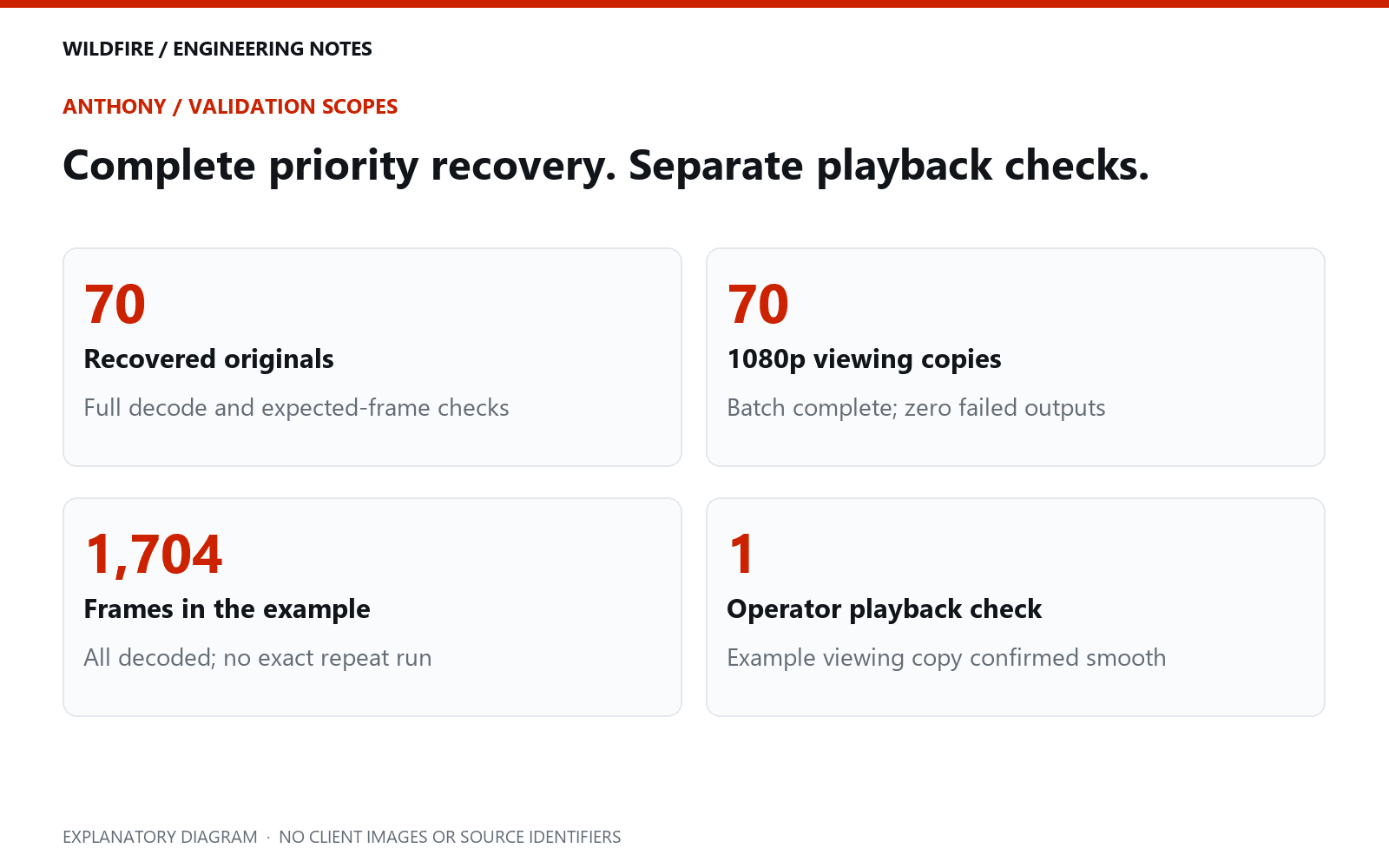
WDR rebuilt the 70 recordings with the newest surviving camera timestamps and checked their full audio and video decoding. When slow starts and freezing were reported, a detailed check of one example found all 1,704 expected frames. A separate 1080p viewing copy then played smoothly in the follow-up playback check. The recovered 4K version was preserved. The subsequent viewing-copy batch also completed: all 70 derivatives passed full decoding and frame-count checks. “Recovered in full” refers to this identified 70-recording priority set, not every historical candidate on the card.
IN THIS ARTICLE
- 01The brief: recover as much as possible, with the newest footage first
- 02Finding recordings beneath a damaged file structure
- 03Inside the reconstruction: using the camera’s sample tables
- 04Why “September” needed careful interpretation
- 05The playback complaint changed the next test
- 06The validation code: more than opening a thumbnail
- 07Preserve the recovered 4K file, provide an easier viewing copy
- 08What this recovery established—and what remained open
- 09What to do when recovered videos freeze
- 10Questions this case helps answer
Engineering notes / 01
The brief: recover as much as possible, with the newest footage first
Anthony’s Sony camera card came to Wildfire Data Recovery with a clear priority: find the most recent collection, expected to contain roughly 66 to 70 recordings. Other material mattered too, but the newest videos were the immediate concern.
The card was initially described as formatted. Its complete treatment history before reaching WDR was not established, so we did not assume which earlier action caused the problem. The working source was a raw image created from the SD card using Oxygen Forensic Detective. Subsequent analysis worked from that image without writing repairs back to the card.
Surviving recording metadata identified a Sony ILME-FX3. That mattered because this was demanding camera footage: the priority files contained 4K video at 50 frames per second, using 10-bit 4:2:2 H.264 at approximately 200 megabits per second. A file like this can place very different demands on a playback system from an everyday phone clip. Sony documents this recording format in its FX3 specification.
Engineering notes / 02
Finding recordings beneath a damaged file structure
A normal folder listing depends on the card’s file-system records. When those records are missing or damaged, the absence of a usable listing does not tell us whether the video payload still exists. We need to examine the stored content and any surviving structures that describe it.
The analysis identified 719 surviving recording tables across the image. These were useful reconstruction leads; they were not a claim that 719 complete, distinct videos had been recovered. Each candidate still needed its media located, its structure rebuilt and its output checked.
For the priority batch, we used the surviving camera timestamps to select the newest 70 candidates. The reconstruction produced files whose expected frame counts could be compared with what the decoder actually read. All 70 passed full audio and video decoding without reported errors, and the video frame counts matched the surviving tables.
This went beyond finding an MP4 extension or generating a thumbnail. Camera files can contain media arranged in fragments, and a simple signature search may not reconstruct that arrangement correctly. PhotoRec’s video documentation describes this fragmentation problem. The useful question is whether the assembled recording has the expected content and sequence.
Engineering notes / 03
Inside the reconstruction: using the camera’s sample tables
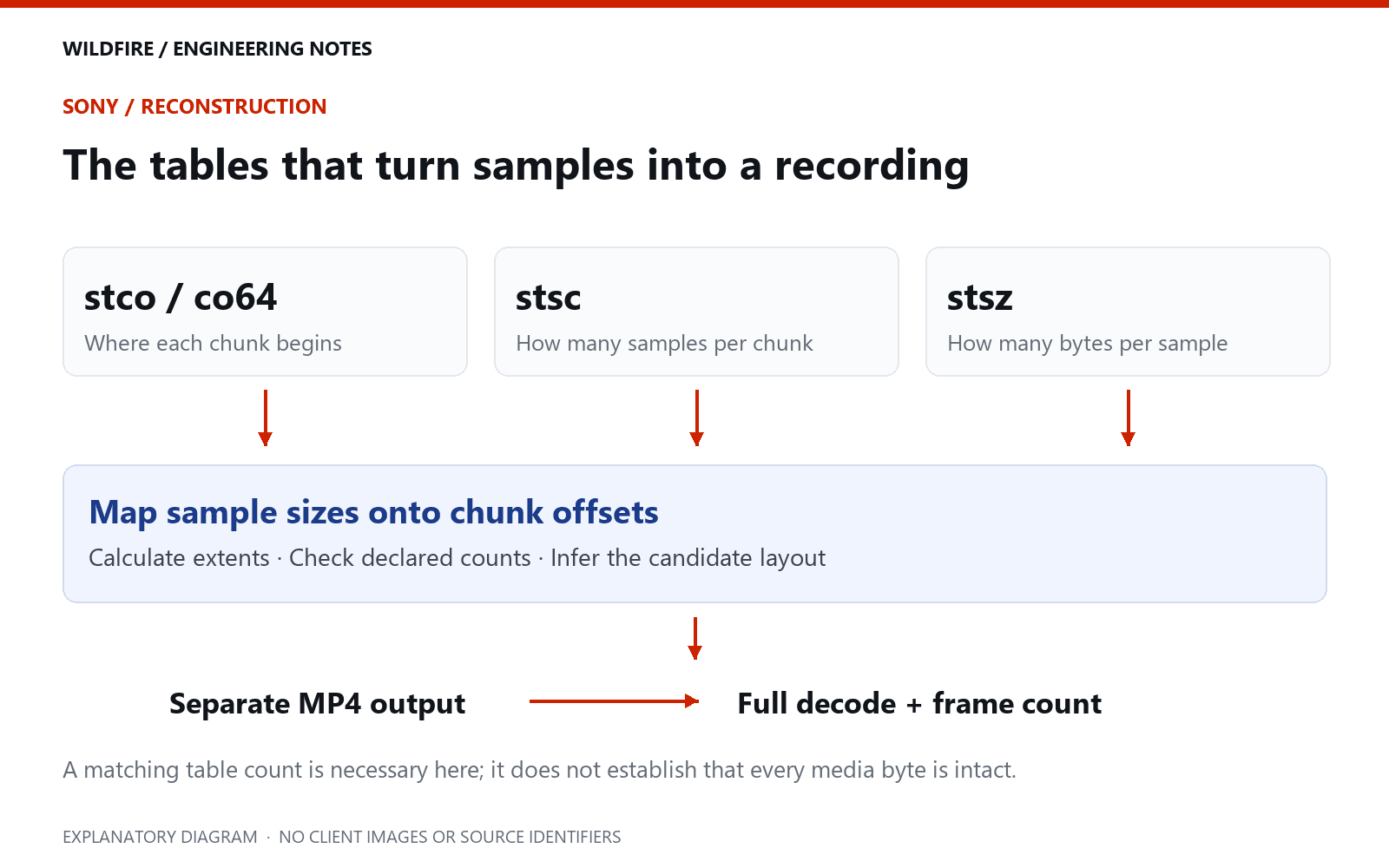
An MP4 is a structured container, not just a run of pictures. In the files examined here, mdat held media payload and moov held the information used to interpret and locate it. The surviving tables gave us a way to test reconstruction candidates even when the normal file-system route had failed.
| Structure | What our parser read | Why it mattered |
|---|---|---|
stco / co64 | Chunk offsets, stored as 32-bit or 64-bit values. | Locate groups of media samples within the reconstructed file. |
stsc | Rules linking chunk ranges to a samples-per-chunk count. | Work out which sample sizes belong to each chunk. |
stsz | A fixed size, or a list of individual sample sizes, and the declared sample count. | Calculate extents and the expected number of video frames. |
stsd / hdlr | Sample-entry identifiers and track handlers. | Distinguish video, audio and other tracks before applying checks. |
mvhd | Version-aware creation time, timescale and duration fields. | Build a candidate inventory; keep clock interpretation separate from byte reconstruction. |
Our Python parser walked the relevant container boxes and decoded multi-byte numeric fields in big-endian order. For each track it mapped the declared samples back through the chunk rules. A disagreement between mapped and declared sample counts caused rejection; it was not silently treated as a complete recording.
# Adapted from the sample-mapping loop used in the Sony case.
# chunks: stco/co64 offsets; rules: stsc entries; sizes: stsz values.
sample_index = 0
rule_index = 0
maximum_end = 0
for chunk_number, chunk_offset in enumerate(chunks, start=1):
    while (rule_index + 1 < len(rules)
           and rules[rule_index + 1][0] <= chunk_number):
        rule_index += 1
    samples_in_chunk = rules[rule_index][1]
    chunk_bytes = (samples_in_chunk * fixed_size if fixed_size
                   else sum(sizes[sample_index:
                                  sample_index + samples_in_chunk]))
    maximum_end = max(maximum_end, chunk_offset + chunk_bytes)
    sample_index += samples_in_chunk
if sample_index != declared_sample_count:
    raise ValueError("sample mapping mismatch")
This is the core of the mapping check, not a standalone recovery application. It assumes the box parser has already produced valid tables. Production examination also needs bounds checks, handling for different container variants and verification of the bytes the tables point to. Passing the count check alone does not establish that the referenced media survived.
The layout assumption we tested
The Sony reconstruction used a case-specific layout model: a 256 KiB leading area and a media allocation rounded to 32 MiB units before the surviving movie index. The code calculated the maximum media extent from the sample tables, rounded the allocation, and inferred the start of the candidate file from the index’s position in the image.
# Case-specific layout model, after inspecting Sony candidates.
header_bytes = 262_144              # 256 KiB, not a NAND page size
allocation_unit = 33_554_432        # observed 32 MiB media allocation
media_allocation = (
    (maximum_end - header_bytes + allocation_unit - 1)
    // allocation_unit
) * allocation_unit
candidate_base = moov_image_offset - media_allocation - header_bytes
# Reject out-of-image extents; verify sample mapping and full decoding.
# Copy only into a separate reconstruction output, never into the image.
These constants describe the layout model used for these candidates. They are not the card’s physical NAND geometry, and they must not be transferred blindly to another Sony model or recording format. We checked the candidates against the image bounds, reconstructed to separate outputs, and then used the full-file validation result to test whether the layout produced usable media.
The recovery writer created a suitable file-type header and media-data box, copied the mapped media area from the image opened in rb mode, and appended the surviving moov data. It calculated a SHA-256 digest of each reconstruction and recorded provenance before validation. That digest makes later changes detectable; it does not by itself prove that the reconstruction is correct.
Engineering notes / 04
Why “September” needed careful interpretation
The requested footage was remembered as a September session. The surviving camera timestamps also pointed to September, but their year was 2025 rather than the expected 2026. We had not verified a 2026 recording at the stage covered by this case study.
It would have been easy to discard the files because the year looked wrong, or to relabel them as 2026 because that matched the brief. Neither would resolve the evidence. Camera metadata is a clock reading, and a clock reading needs context. A recording’s contents and the client’s recognition of the session are separate checks.
We therefore treated “newest” as a documented selection rule: newest according to the surviving camera timestamps. It did not establish the true calendar date. The year discrepancy remained open for review, rather than being hidden behind a confident folder name.
Engineering notes / 05
The playback complaint changed the next test
After reconstruction, WDR received a report that some videos froze or took a long time to begin playing. That feedback mattered even though the decoder checks had passed. A recovered file has to be useful to the person opening it.
We selected the reported example for a deeper check. It was 34.08 seconds long and approximately 906 MB, with 1,704 expected video frames. Full decoding produced all 1,704 frames without errors. Their presentation timestamps were unique and regularly spaced. A reduced-resolution comparison also found 1,704 distinct frames, with no exact repeated-frame run in that test.
Those findings did not certify every pixel or prove that every other file was perfect. They did show that this example was not simply an incomplete clip that stopped decoding at the apparent freeze. We could then investigate how the file was being read and played, alongside its integrity.
Engineering notes / 06
The validation code: more than opening a thumbnail
We used FFmpeg to decode the complete video track and the available audio tracks to a null output. This tests processing through the file without creating another video. We retained the progress output and error log rather than treating a zero process exit code as sufficient.
ffmpeg -v error -nostdin -i recovered_master.mp4 -map 0:v:0 -map "0:a?" -vsync 0 -progress pipe:1 -f null -# Acceptance predicate used by the reconstruction validator.
expected = next(t["sample_count"] for t in tracks
if t.get("handler") == "vide")
actual = progress_frame_counts[-1] if progress_frame_counts else None
passed = (decode_returncode == 0
and decode_error_log_bytes == 0
and actual == expected)For the reported example, the independent numbers agreed: 34.08 seconds × 50 frames per second = 1,704 frames. The surviving sample count and the decoded frame count were both 1,704. That checks duration and sample completeness for this clip; it is still not a guarantee about every image’s visual meaning.
Checking whether the apparent freeze was in the decoded pictures
The next test decoded every video frame, reduced it to 160 × 90 greyscale and generated a per-frame digest. The compact representation made it practical to look for exact repeated-frame runs without retaining or publishing a contact sheet of identifiable footage.
ffmpeg -v error -nostdin -i recovered_master.mp4 -map 0:v:0 -vsync 0 -an -vf "scale=160:90:flags=area,format=gray" -f framemd5 frame_checks.txtAll 1,704 reduced frames in the example were distinct. We also examined packet timestamps: presentation timestamps were unique, their sorted spacing was 20 ms, and decoding timestamps increased consistently. Presentation order and decoding order can differ in compressed video, so checking both avoids assuming that packet order alone is the displayed order.
A static scene can legitimately produce repeated pictures. Conversely, subtle corruption can change pixels and therefore change a digest. The hash test is a screening tool for a particular kind of freeze, not a visual-quality certificate. The later 70-copy batch flagged runs of at least one second for review and reported none at that threshold.

The source example was approximately 906 MB. Copying it from the active recovery volume took 58.922 seconds in that observation, about 15.4 MB/s. Its approximately 200 Mb/s video stream alone represents about 25 MB/s before audio and container overhead. That comparison made storage contention worth investigating, but one loaded-system copy test could not establish the sole cause of a player’s freezing.
Engineering notes / 07
Preserve the recovered 4K file, provide an easier viewing copy
The example’s video format, large data rate, storage access and player behaviour were all relevant to playback. Local checks showed that startup also changed when the file was read from a different working drive. Those checks occurred during active recovery work, so they were diagnostic observations rather than a controlled performance benchmark.
We created a separate 1080p viewing copy using widely supported 8-bit H.264 video and AAC audio, retaining the original 50-frame-per-second cadence. It was checked through the full duration and produced all 1,704 frames without decode errors. The follow-up playback check confirmed that this copy played smoothly.

The viewing copy was a derivative, with lower resolution and a new encoding. It was not a substitute for the recovered 4K file, and transcoding did not invent missing footage. Keeping both serves two purposes: the recovered version retains the original-quality streams, while the lighter copy makes review easier.
We also prepared an alternative 4K file with its existing index moved towards the beginning, preserving the encoded video and audio streams. This addresses file organisation rather than picture reconstruction. FFmpeg describes the index-placement principle as “faststart” for MOV and MP4; its effect should still be tested in the intended player.
The viewing-copy command and what it changes
The batch used the following conversion settings, with worker-specific thread limits omitted below. The input had already been recovered and checked. This command is a playback conversion, not the command that reconstructed the formatted card.
ffmpeg -v error -nostdin -i recovered_master.mp4 -map 0:v:0 -map 0:a:0 -map_metadata 0 -vf "scale=1920:1080:flags=lanczos:out_range=tv,format=yuv420p" -c:v libx264 -preset fast -crf 18 -profile:v high -level:v 4.2 -g 50 -keyint_min 25 -vsync 0 -c:a aac -b:a 192k -movflags +faststart -n viewing_copy_1080p.mp4yuv420p produces 8-bit 4:2:0 video; the source was 10-bit 4:2:2. Scaling reduces 3840 × 2160 to 1920 × 1080. CRF 18 controls the new H.264 encode, AAC replaces PCM in the viewing copy, and +faststart prepares a front-loaded index. The supplied source cadence remains 50 fps; the workflow does not interpolate missing pictures. Colour range and transfer characteristics still require review when preparing footage for editing or colour-critical work.
The batch produced 70 of 70 viewing copies, with no failed outputs. Every completed copy was decoded again and compared with its expected frame count before being marked ready. The batch totals are an automated validation result; the separate smooth-playback confirmation applies to the example tested in the operator’s player.
A separate 4K option: moving the index without re-encoding
We also tested a different solution for the example. Its recovered MP4 had spare free space near the beginning and an index at the end. There was enough room to put the existing moov in the leading space while keeping the media-data box at exactly the same byte offset.

# From the case's index-relocation method; names simplified.
gap = mdat_offset - ftyp_size - moov_size
if gap < 8:
    raise RuntimeError("Insufficient existing header padding")
new_header = (
    ftyp_bytes + moov_bytes
    + struct.pack(">I4s", gap, b"free") + bytes(gap - 8)
)
if len(new_header) != mdat_offset:
    raise ValueError("Media offsets would move")
# Write new_header to a NEW file, then copy the original mdat box.
# Keep the recovered master and verify the resulting streams.
Keeping the media offset unchanged meant the original chunk offsets continued to point to the same payload positions. This depends on having enough suitable leading padding and the validated layout used here. It is not a general instruction to move arbitrary MP4 boxes without updating offsets.
To check preservation of the encoded video and audio, we compared the stream hashes before and after the move using stream copy mode. The corresponding hashes matched, and the 4K alternative decoded all 1,704 expected frames without errors.
ffmpeg -v error -nostdin -i recovered_master.mp4 -map 0:v:0 -map 0:a:0 -c copy -f streamhash -hash sha256 -
ffmpeg -v error -nostdin -i index_relocated_copy.mp4 -map 0:v:0 -map 0:a:0 -c copy -f streamhash -hash sha256 -
The whole-file hash necessarily changes when the file layout changes. Matching encoded-stream hashes supports a narrower conclusion: those video and audio streams were retained. It does not prove that the earlier recovery captured every original byte. General muxer behaviour is described in the FFmpeg format documentation; the case result comes from these specific checks.
Engineering notes / 08
What this recovery established—and what remained open
The priority result was substantial: 70 rebuilt recordings, all passing the documented full decoding and frame-count checks. The detailed playback investigation also produced a practical viewing solution for the reported example without sacrificing the recovered 4K version.
The complete 70-video priority set and its 70 viewing derivatives now have documented automated checks. The work did not establish that every surviving candidate in the image was complete, that all footage had been visually reviewed, or that the camera’s recorded year matched the actual shoot. Deeper examination of other material continued beyond this milestone. Separating these claims makes the result more useful: a client can understand exactly what has been recovered, how it has been tested and what still needs their review.
Engineering notes / 09
What to do when recovered videos freeze
Keep the recovered originals and record which files and playback conditions show the problem. A useful assessment compares expected and decoded frame counts, checks the full audio and video streams, examines timing, and tests a separate playback copy. Opening successfully for a few seconds is not the same as passing a complete check.
If the source card is still involved, stop using it for new recordings and avoid writing repaired or recovered files back to it. Explain any previous formatting, scans or repair attempts to the recovery specialist. An uncertain history can still be worked with; an assumed history can lead the analysis in the wrong direction.
Questions & answers
Questions this case helps answer
Can an SD card be recovered after formatting?
Sometimes, if enough of the original data and useful structures survive. The type of format and later writes matter. In Anthony’s case, recoverable recording structures remained in the image; that does not predict the outcome for every formatted card.
Does a freezing MP4 prove the recovery failed?
No. Missing or incorrectly assembled data can cause playback faults, but the player, video format and storage access also need checking. Here, a detailed example fully decoded and a separate viewing copy played smoothly.
Does a clean decode prove every frame is correct?
No. It establishes that the decoder processed the file without reported errors. Expected frame counts, timing, visual review and confirmation that the footage matches the brief provide additional evidence.
Will a 1080p copy replace the recovered 4K video?
It should be labelled and supplied separately. The 4K file preserves the recovered source-quality streams; the 1080p derivative is for convenient review and playback.
Why not search only for videos dated 2026?
That could exclude relevant footage if the camera clock was wrong. We retained the surviving dates as evidence and kept the actual year unresolved until it could be corroborated.
Need help with a camera card or recovered video?
Tell WDR what happened, which footage matters most and what has already been tried. We can assess the source and explain the recovery and validation work it needs.
Shared with permission using Anthony’s first name only. The headers and editorial artwork are AI-generated conceptual illustrations; technical diagrams are labelled separately. No client footage, faces or identifying locations are shown. Results describe this individual case at the documented stage and do not guarantee another recovery.